

Опис
VintageJS allows you to apply a custom retro, vintage look to WordPress post images.
This jQuery-Plugin was tested and worked fine in the following browsers:
Mozilla FireFox 3.16.14
Google Chrome 9.0.597.107
Apple Safari 5.0.3
Opera 11.01
Internet Explorer 9
Javascript by R. Fleischmann http://vintagejs.com
Instructions
To add vintage effect to an image you just need to uploaded image then choose to add the filter before inserting image into post.
Notes
License.txt – contains the licensing details for this component.
Снимци екрана
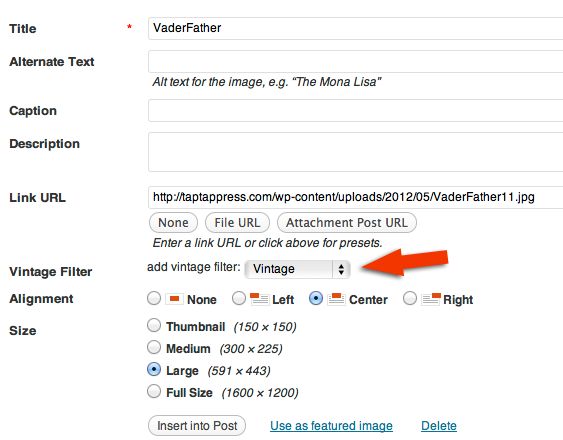

Постављање
Automatic Installation
- From inside your WordPress administration panel, visit ‘Plugins -> Add New’
- Search for
Vintage.jsand find this plugin in the results - Click ‘Install’
- Once installed, activate via the ‘Plugins -> Installed’ page
- Choose filter on image upload.
Manual Installation
- Upload
vintagejsto the/wp-content/plugins/directory - Activate the plugin through the ‘Plugins’ menu in WordPress
- Choose filter on image upload.

Сарадници и градитељи
„Vintage.js“ је софтвер отвореног кода. Следећи људи су допринели овом додатку.
Сарадници
Преведите „Vintage.js“ на свој језик.
Заинтересовани сте за градњу?
Прегледајте код, проверите SVN складиште или се пријавите на белешку градње преко RSS-а.
Белешка о изменама
1.0
beta version.