Скочи на садржај
WordPress.org

Српски

  • Теме
  • Додаци
  • Новости
    • Документација
    • Форуми
  • Информације
  • Упутства
  • Речник
  • @wp_sr
  • Организација
  • Get WordPress
Get WordPress
WordPress.org

Plugin Directory

TD Admin Lock & Load

  • Submit a plugin
  • My favorites
  • Log in
  • Submit a plugin
  • My favorites
  • Log in

Овај додатак није испробан са последња 3 главна издања Вордпреса.Можда се више не одржава или подржава и можда има грешке са усклађеношћу са новијим издањима Вордреса.

TD Admin Lock & Load

transcendev
Преузимање
  • Детаљи
  • Прегледи
  • Постављање
  • Изградња
Подршка

Опис

Don’t leave your barn door open! Lock down your admin login form and load up another site instead for unwanted guests.

On servers with limited memory, recursive calls to your WordPress admin login panel alone can lead to serious memory and load
issues that can potentially crash your server. This plugin prevents access to
the login screen without the correct access code appended to the url.

This plugin will kill the process of loading the admin panel prior to the loading of
the template, and other such resource intensive processes that occur even when a user is not yet logged in.

How to Use
1. Create your access code.
2. Click the Activate Admin Lock checkbox.
3. Optionally divert traffic to another url.
4. Future admin login should use the following URL:
http://www.yoursite.com/wp-admin/?a=CODE
Where „CODE“ is the access code you enter.

Visit www.TranscenDevelopment.com for more information.

Снимци екрана
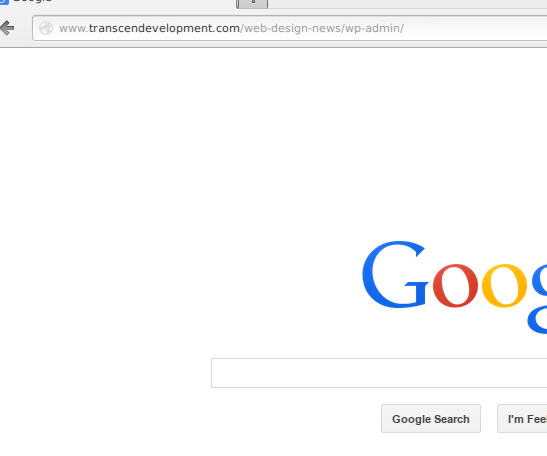
  • Divert unwanted traffic to your admin login off to any url you desire. I’m sending people off to Google. So long suckers!
  • Access the admin login with the proper access code and you’ll have the VIP treatment of being shown your WP login.
  • I’ve successfully logged in with both my access code and my normal username and password.
  • TD Admin Lock, nicely tucked in to your normal WP Settings menu.
  • This is where the magic happens.

Постављање

  1. Upload the „td-admin-lock“ folder to the /wp-content/plugins/ directory
  2. Activate the plugin through the ‘Plugins’ menu in WordPress
  3. Log into Wordpres and go to Settings->TD Lock Admin
  4. Configure and activate as desired

ЧПП

None yet…feel free to ask 🙂

Прегледи

Нема рецензија за овај додатак.

Сарадници и градитељи

„TD Admin Lock & Load“ је софтвер отвореног кода. Следећи људи су допринели овом додатку.

Сарадници
  • transcendev

Преведите „TD Admin Lock & Load“ на свој језик.

Заинтересовани сте за градњу?

Прегледајте код, проверите SVN складиште или се пријавите на белешку градње преко RSS-а.

Белешка о изменама

1.0.1

  • Various bugs fixed

1.0.0

  • A new plugin is born.

Мета

  • Version 1.0.1
  • Last updated 12 година раније
  • Active installations 10+
  • Language
    English (US)
  • Tags
    botnetsecuritywordpress security
  • Напредни преглед

Оцене

5 out of 5 stars.
  • 1 5-star review 5 stars 1
  • 0 4-star reviews 4 stars 0
  • 0 3-star reviews 3 stars 0
  • 0 2-star reviews 2 stars 0
  • 0 1-star reviews 1 star 0

Додај моју оцену

See all reviews

Сарадници

  • transcendev

Подршка

Имате нешто да кажете? Потребна вам је помоћ?

Види форум подршке

Донирај

Желите ли да подржите напредак овог додатка?

Донирај овом додатку

  • About
  • News
  • Hosting
  • Privacy
  • Showcase
  • Themes
  • Plugins
  • Patterns
  • Learn
  • Support
  • Developers
  • WordPress.tv ↗
  • Get Involved
  • Догађаји
  • Donate ↗
  • Five for the Future
  • WordPress.com ↗
  • Matt ↗
  • bbPress ↗
  • BuddyPress ↗
WordPress.org
WordPress.org

Српски

  • Visit our X (formerly Twitter) account
  • Посетите наш Bluesky налог
  • Visit our Mastodon account
  • Посетите наш налог на Threads-у
  • Visit our Facebook page
  • Посетите наш Инстаграм налог
  • Visit our LinkedIn account
  • Посетите наш TikTok налог
  • Visit our YouTube channel
  • Посетите наш Tumblr налог
Кôд је поезија.
The WordPress® trademark is the intellectual property of the WordPress Foundation.