

Опис
LBC Optimize Images is a powerful, highly efficient, and lightweight WordPress image optimization plugin designed to instantly speed up your website. By automatically converting your existing and newly uploaded images into next-generation formats like AVIF and WebP, it drastically reduces page load times and helps you achieve perfect scores on Google PageSpeed Insights and Core Web Vitals.
If you want to speed up WordPress without complex configurations, this is the plugin for you. Instead of permanently altering or replacing your original media files, our plugin safely creates optimized, lightweight copies and seamlessly serves them to your visitors.
Why Choose LBC Optimize Images?
Site speed is a critical SEO ranking factor. Serving large JPEG and PNG images slows down your site and hurts your Google rankings. Our plugin solves this by automatically serving next-gen image formats (AVIF and WebP), resulting in up to 80% smaller file sizes with no visible loss in quality.
🔥 Key Features & Benefits
- Next-Gen Image Formats: Automatically converts JPEG and PNG into modern, highly compressed AVIF (primary) and WebP (fallback) formats.
- Boost SEO & Core Web Vitals: Dramatically improve your website’s loading speed to rank higher on Google search results and enhance user experience.
- 1-Click Bulk Image Optimizer: Easily compress and optimize your entire existing media library in the background with a single click.
- Zero Risk to Original Images: Your original files remain completely untouched and safe. Optimized copies are stored separately in your
wp-content/uploads-lbcimg/folder. - Universal Server Compatibility: Dual delivery system uses both
.htaccessrules and smart HTML Output Buffering to ensure images serve flawlessly on Apache, LiteSpeed, Nginx, IIS, and more. - Customizable Compression: Take control of your image quality. Adjust WebP and AVIF compression levels directly from the dashboard to balance speed and visual clarity.
- Block Theme & Page Builder Compatible: Works perfectly with classic themes, Elementor, Divi, and modern Full Site Editing (FSE) block themes.
- Clean & Bloat-Free: Leaves no trace. If you ever uninstall the plugin, it completely cleans up all optimized images and database settings to free up server space.
🚀 How It Works (The Magic Behind the Speed)
- Upload: When you upload a new image or run the Bulk Optimizer, the plugin utilizes your server’s native Imagick or GD libraries to generate ultra-lightweight
.avifand.webpcopies. - Store: These optimized files are safely stored in a dedicated folder mirroring your exact media library structure.
- Serve: When a user visits your site, the plugin instantly intercepts the HTML and serves the fast-loading
.avifor.webpfiles to compatible browsers. - Fallback: For maximum compatibility, Apache and LiteSpeed servers also benefit from
.htaccessrewrite rules.
🛡️ 100% Safe: No Backup Required
Because LBC Optimize Images never alters, overwrites, or deletes your original uploaded media, you don’t need complicated backup strategies! Your original files remain exactly as they were in wp-content/uploads/. If you ever deactivate the plugin, WordPress will immediately and seamlessly revert to serving your original images.
Configuration
After installing and activating the plugin, you can easily tweak the settings to maximize your site speed:
- Navigate to Dashboard LBC Optimize Images.
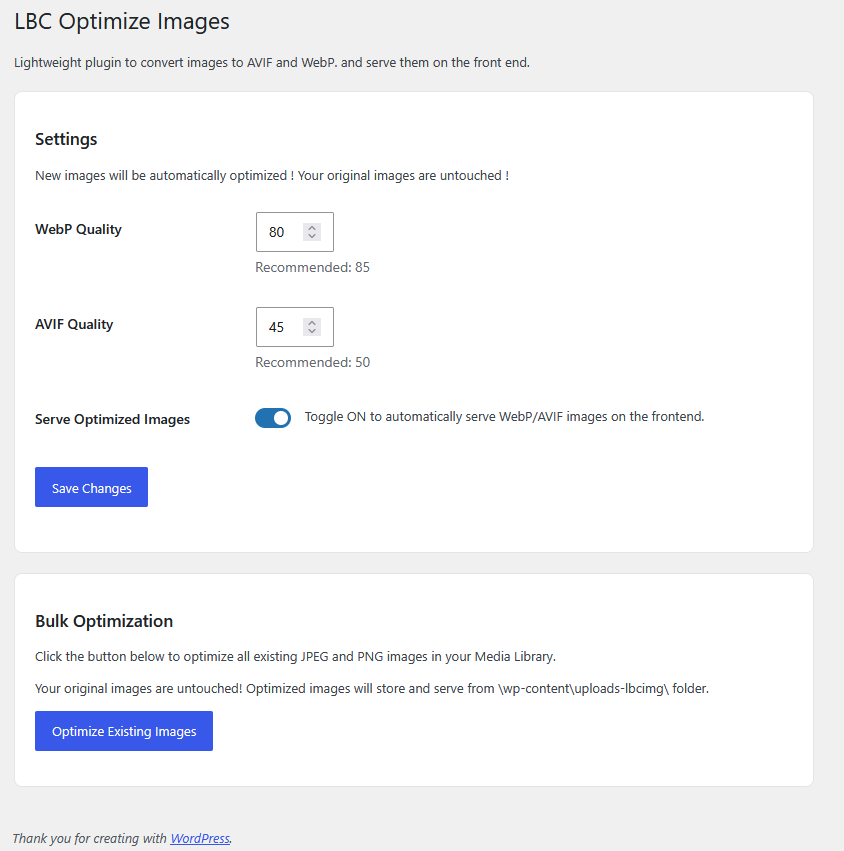
- WebP Quality: Adjust the compression level for WebP images (default is 85). Lower values reduce file size for faster loading, while higher values prioritize image quality.
- AVIF Quality: Adjust the compression level for AVIF images (default is 50). AVIF offers superior next-gen compression, meaning lower values often retain excellent visual quality while dramatically shrinking file sizes.
- Serve Optimized Images: Keep this toggled ON to automatically serve WebP/AVIF images on the frontend. Turning it off will serve original images, though background optimization for new uploads will continue.
Usage
Automatic Image Optimization
Once active, you don’t have to do anything! Any new JPEG or PNG uploaded to your Media Library is automatically converted into SEO-friendly AVIF and WebP formats in the background.
Bulk Image Optimizer (For Existing Media)
To compress and optimize your existing media library and instantly boost your Core Web Vitals:
1. Go to Dashboard LBC Optimize Images.
2. Scroll down to the Bulk Optimization section.
3. Click the Optimize Existing Images button.
4. The plugin will intelligently process all your existing images in batches. Keep the page open until the progress bar hits 100%.
Снимци екрана
Постављање
Option 1: Install via WordPress Dashboard (Recommended)
- Navigate to Dashboard Plugins Add New.
- Search for LBC Optimize Images.
- Click Install Now, and then click Activate.
- That’s it — your site will immediately start optimizing new image uploads!
Option 2: Upload via WordPress Dashboard
- Download the plugin ZIP from the official repository: https://wordpress.org/plugins/lbc-optimize-images/
- Go to Dashboard Plugins Add New Upload Plugin.
- Select the downloaded ZIP file and click Install Now.
- Click Activate Plugin.
Option 3: Upload via FTP
- Download the plugin ZIP file.
- Extract the ZIP to reveal the
lbc-optimize-imagesfolder. - Upload the entire folder to the
/wp-content/plugins/directory on your server. - Go to Dashboard Plugins, locate the plugin, and click Activate.
ЧПП
-
Does this plugin delete my original images?
-
No! Your original image files are never touched, altered, or deleted. The plugin generates optimized copies in a separate, secure directory (
wp-content/uploads-lbcimg/). -
Will it break my site if I uninstall the plugin?
-
Not at all. Upon uninstallation, the plugin safely deletes the
uploads-lbcimgfolder to free up disk space and removes its configuration settings. Your website will instantly and seamlessly revert back to serving your original uncompressed images. -
Does this image optimizer work on Nginx or IIS servers?
-
Yes! Unlike some plugins that rely entirely on Apache, our plugin utilizes a smart HTML rewriting engine. This ensures your optimized images are served flawlessly on all server types, including Nginx and IIS. Just make sure the „Serve Optimized Images“ toggle is ON in the settings.
-
What if my server doesn’t support Imagick for AVIF?
-
LBC Optimize Images uses a smart fallback system. It first attempts to use the
ImagickPHP extension (which provides the absolute best quality and AVIF support). If Imagick isn’t installed on your server, it gracefully falls back to the native PHPGDlibrary to handle WebP conversions, ensuring your site still benefits from next-gen image optimization.
Прегледи
Нема рецензија за овај додатак.
Сарадници и градитељи
„LBC Optimize Images“ је софтвер отвореног кода. Следећи људи су допринели овом додатку.
Сарадници
Преведите „LBC Optimize Images“ на свој језик.
Заинтересовани сте за градњу?
Прегледајте код, проверите SVN складиште или се пријавите на белешку градње преко RSS-а.
Белешка о изменама
1.2
- Fixed: HTML rewriter now skips all admin contexts including AJAX — prevents output buffer from wrapping admin AJAX JSON responses
- Fixed: HTML rewriter now explicitly skips REST API, WP-Cron, and RSS/Atom feed requests to prevent rewriting non-HTML output
- Fixed: Bulk optimization now correctly finds all attachments — added missing
post_status = inheritto the process step query - Fixed: Output buffer null-safety — if regex fails on very large pages, original HTML is served as fallback instead of a blank page
- Code: Added inline comment documenting that only JPG and PNG are intentionally supported as source formats
1.1
- Fixed plugin review
- CSS and JS use WP API
- Sanitization for register_setting
- Use ob_get_clean
- Optimized and clean code
- and other minor issues like now JS file is translation ready
- Plugin activate, deactivate, delete tested
1.0
- Initial release.
- Added AVIF and WebP generation.
- Added HTML Rewriter for universal server compatibility.
- Added bulk optimization tool.