
Опис
Your WordPress site, now in the conversation
Jetpack connects your WordPress site to ChatGPT, Claude, and the other AI agents you already use. Ask in plain language to draft a post, see which pages got the most views, check your backups, or run a security scan, and your agent takes care of it on your site. There’s no MCP server to set up or host.
That works because Jetpack plugs your site into WordPress.com’s cloud, the same infrastructure that runs millions of sites. The heavy lifting happens there instead of on your host: backups stored off-site with one-click restores and full site migration, malware scanning, brute force protection, downtime monitoring, site analytics with Jetpack Stats, spam filtering, an image CDN, and ad-free video hosting. Plus a firewall, SEO tools, newsletters, social sharing, and forms.
„All these years later, Jetpack is the iCloud for my WordPress.“ Matt Mullenweg, co-founder of WordPress (review)
How to get started with Jetpack
Installation is free, quick, and easy. From your WordPress dashboard, add a new plugin, search for Jetpack, and install it. Activate it and connect your WordPress.com account, then open Jetpack AI in your Jetpack menu to connect your AI agent. Unlock real-time backups, one-click malware fixes, and advanced stats by upgrading to a paid plan.
Need expert support?
Имамо глобални тим Happiness Engineer-а спреман да пружи невероватну подршку. Поставите питања на форуму подршке или се обратите подршци.
Why use Jetpack on your site
Connect ChatGPT, Claude, and other AI agents
Manage your site from the AI tools you already use. Connect ChatGPT or Claude in a few clicks, then ask for what you need in plain language. Your agent can work with more than your posts and pages: Jetpack also gives it your stats, backups, security scans, and newsletter, so one conversation covers your whole site.
- Use the AI tools you prefer. Jetpack works with ChatGPT, Codex, Claude, Claude Code, Cursor, VS Code, Continue, and any other MCP client.
- Ask which posts got the most views, check your backups and activity log, run a security scan, change newsletter settings, or turn on downtime monitoring.
- Draft posts, build a page from a single prompt, organize your Media Library, and optimize your site.
- Choose what your agent can read and what it can change, and turn individual tools on or off whenever you like.
- Your agent acts on your behalf through your WordPress.com account connection, so there’s nothing extra to host.
Security, backup, and migration
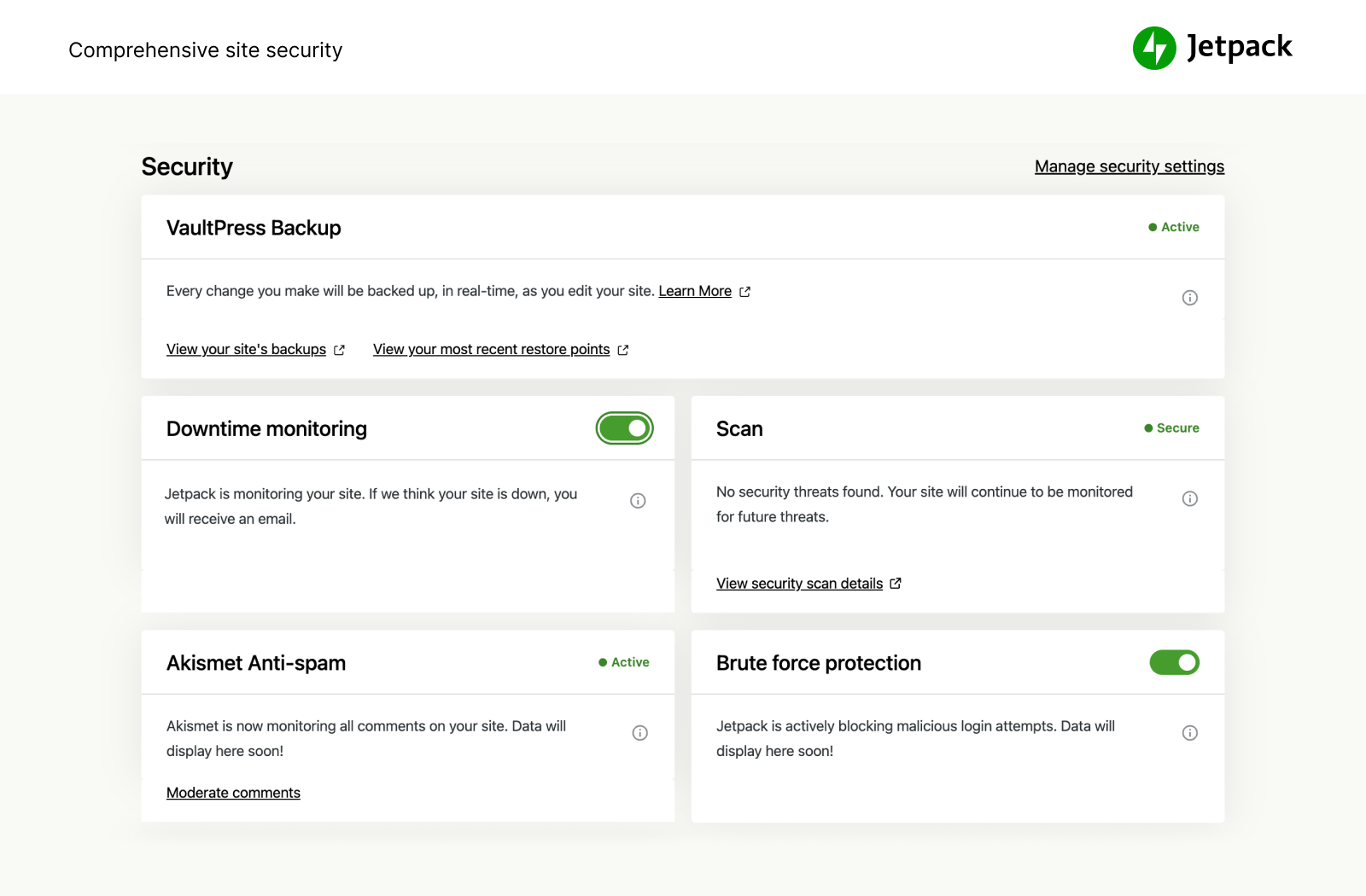
Jetpack Protect watches your site around the clock, and VaultPress Backup keeps a copy of everything off-site so you can undo any mistake. Login protection and basic downtime monitoring are free.
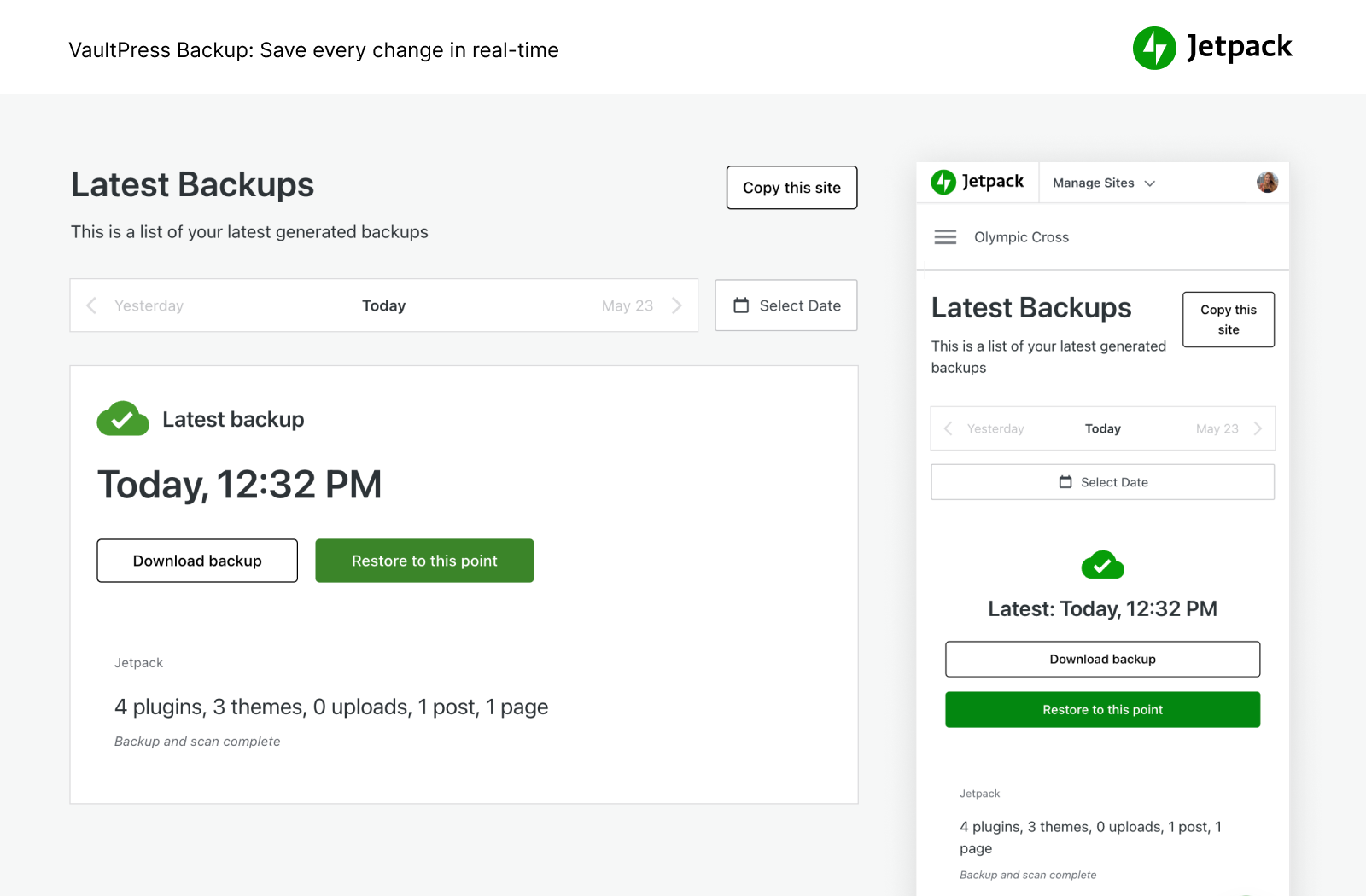
- Back up your site automatically in real time and restore to any point with one click. Storage starts at 10GB, with more available if you need it. Great for WooCommerce and other ecommerce stores, where every order counts.
- Migrate your site to a new host, clone it, or set up a test site from any backup.
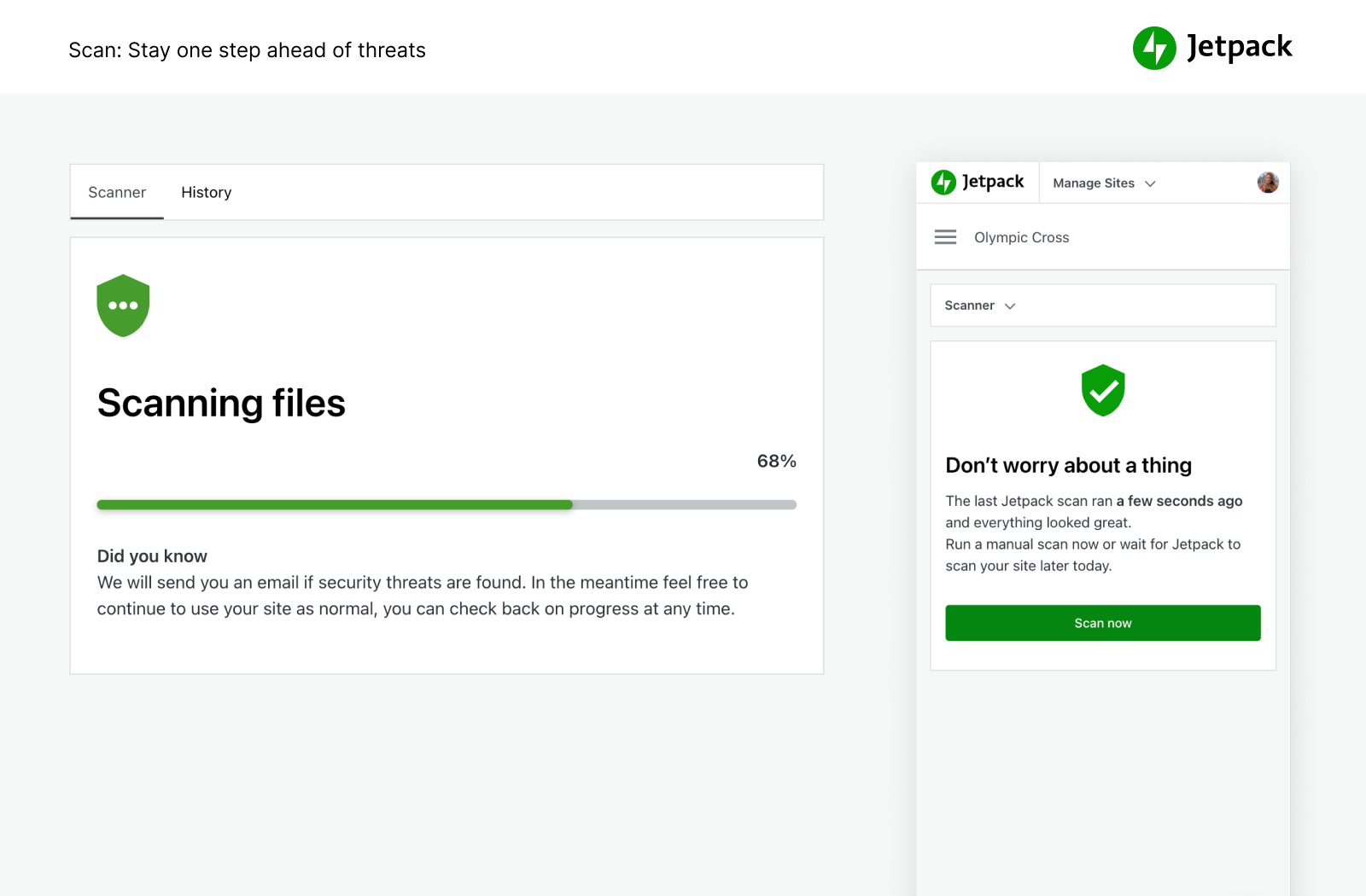
- Scan for malware and vulnerabilities automatically, with one-click fixes.
- Block malicious traffic with a web application firewall (WAF), especially while attackers exploit unpatched plugins.
- Stop brute force attacks on your login page, and add two-factor authentication (2FA) with secure WordPress.com login.
- Monitor your site’s uptime and get an email alert the moment it goes down.
- See every change and who made it in the activity log.
- Block spam comments and form responses with Akismet Anti-spam.
- Auto-update individual plugins.
Get every security feature in Jetpack Pro or Complete, or buy VaultPress Backup, Scan, and Akismet Anti-spam on their own.
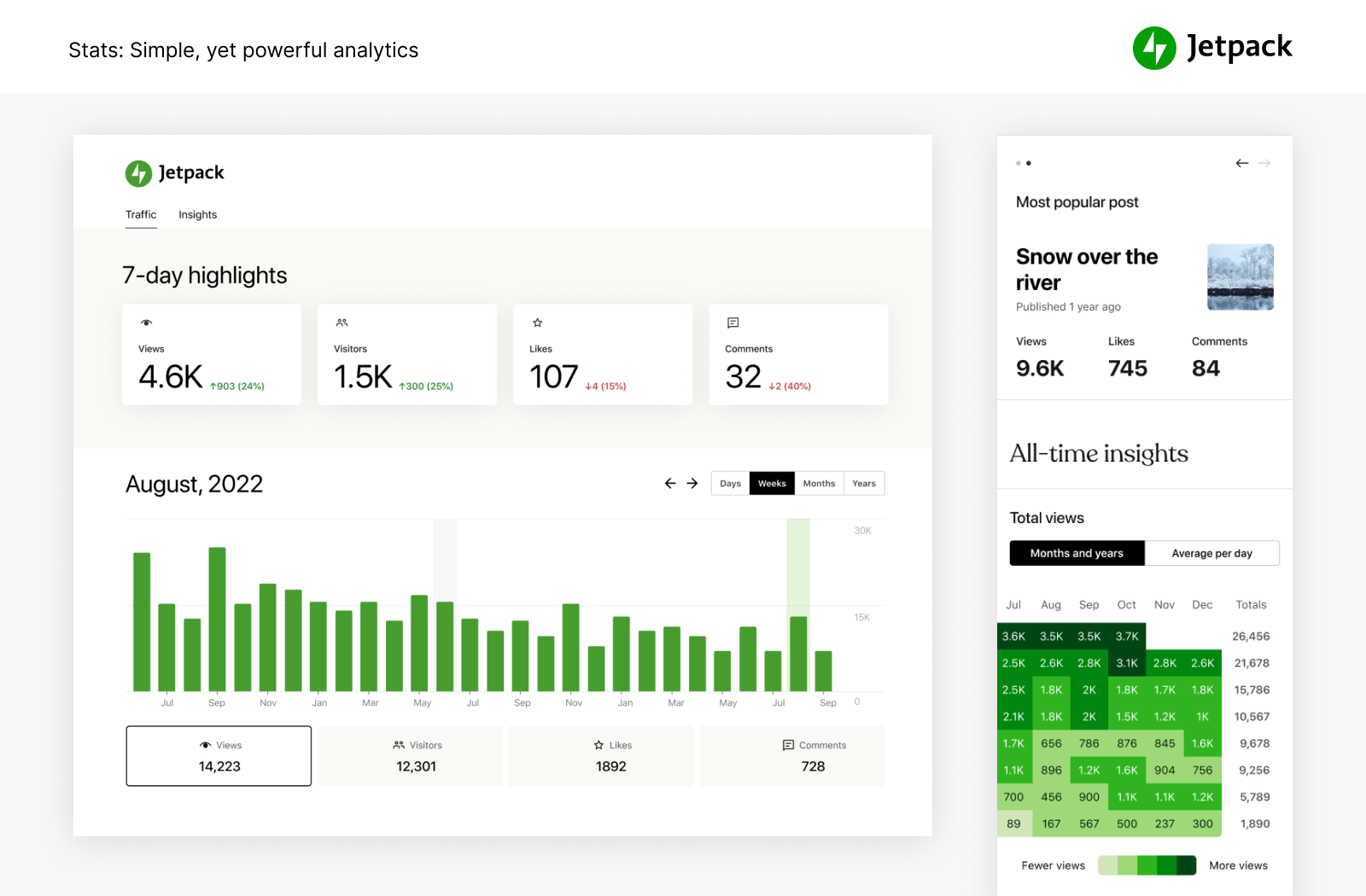
Site analytics with Jetpack Stats
Get clear site statistics without being a data scientist.
- Watch visitors, views, likes, and comments in real time.
- Find your top posts and pages, and the referrers and countries that send you traffic.
- Measure link clicks, video plays, and file downloads.
- See which authors on your team write the most popular content, and where your posts get shared.
- Spot trends with 7-day highlights and Year in Review.
Grow your audience
- Turn your posts into a newsletter, and offer paid subscriptions.
- Auto-share posts to Facebook, Instagram, LinkedIn, Threads, Bluesky, Tumblr, Mastodon, and Nextdoor.
- Grow traffic with SEO tools for Google, Bing, Facebook, and WordPress.com, plus an automatic XML sitemap.
- Collect payments and donations, or sell products, services, and memberships, with Stripe and PayPal.
- Build contact forms with no code and get an email for every response.
- Promote your posts across millions of sites in the WordPress.com and Tumblr ad network with Blaze, for a few dollars.
- Earn money by showing high-quality ads on your site.
- Keep visitors reading with related posts, and add image galleries and slideshows.
- Manage your site on the go with the Jetpack mobile app for iOS and Android.
Write with Jetpack AI
Jetpack AI works right in the WordPress editor. Give it a prompt and it drafts posts, pages, lists, and tables, then helps you edit and translate them.
- Write a first draft from a prompt without leaving the editor.
- Change the tone, fix spelling and grammar, or make text shorter or longer.
- Translate your content into many languages.
Speed and performance
- Serve images and static files like CSS and JavaScript from our global CDN instead of your server, which saves bandwidth and speeds up your site on mobile.
- Host video with no ads and no recommendations that lead visitors off your site.
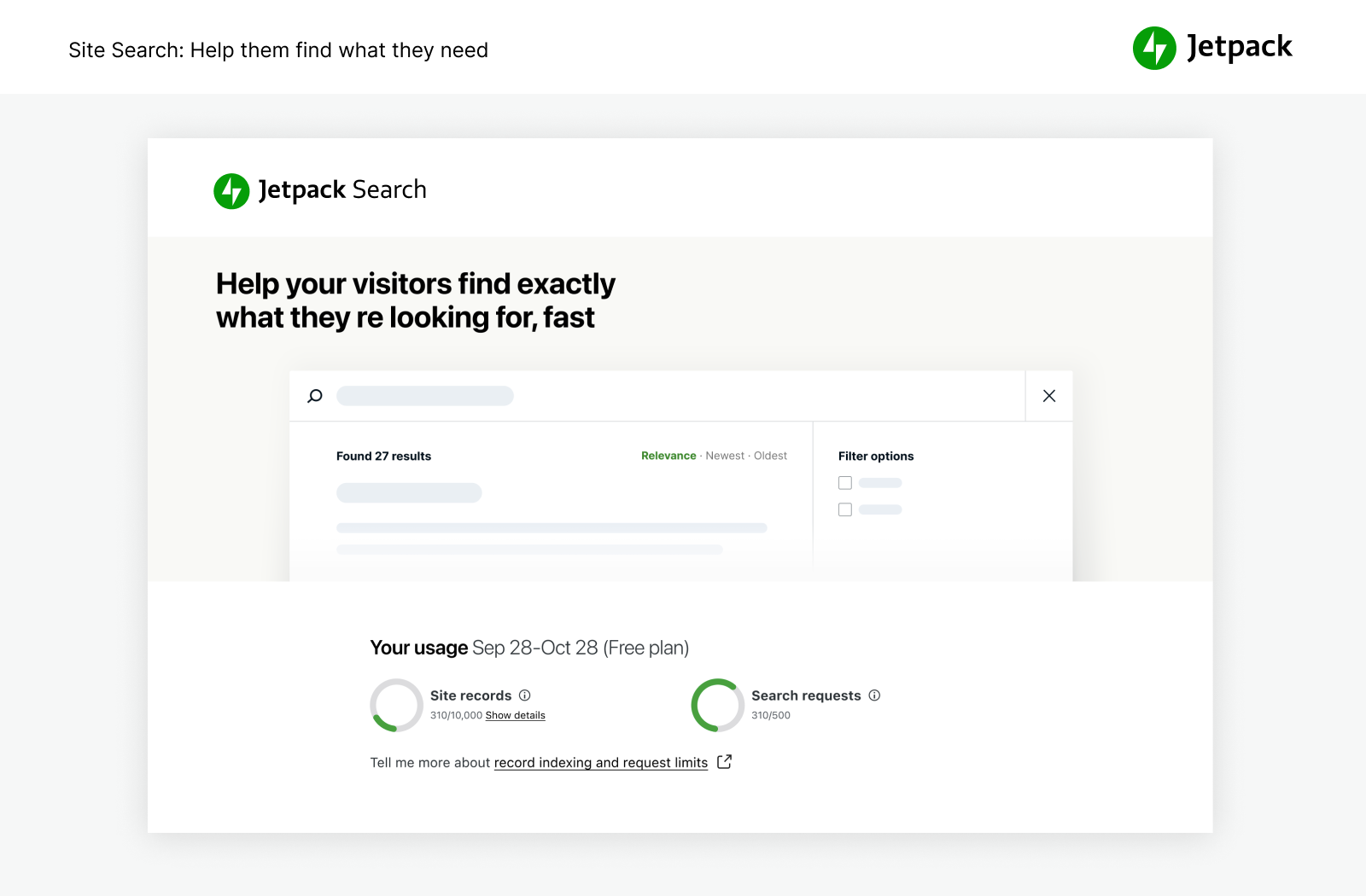
- Help visitors find what they need with fast, customizable site search, including product filters for WooCommerce stores.
- Pair Jetpack with Jetpack Boost for page caching and better Core Web Vitals.
Integrations
Jetpack is updated monthly to work with the plugins and services you already use.
- WooCommerce: Jetpack and WooCommerce are both made by Automattic, so Backup, Scan, Stats, and Anti-spam work with your store out of the box.
- Social networks: Facebook, Instagram, LinkedIn, Threads, Bluesky, Tumblr, Mastodon, and Nextdoor.
- Payments: Stripe and PayPal.
- Email marketing: Mailchimp.
- Anti-spam (powered by Akismet) for Jetpack Forms, Contact Form 7, Ninja Forms, Gravity Forms, Formidable Forms, and more.
- Caching: works with WP Super Cache and Cloudflare.
- Blocks for Calendly, Pinterest, WhatsApp, Eventbrite, OpenTable, podcasts, maps, and GIFs.
Plans and products
- Jetpack Complete – Everything Jetpack offers: real-time security, top performance, and growth tools in one plan.
- Jetpack Pro – Security, performance, and growth tools in one plan, including real-time backups, malware scanning, and spam protection.
- VaultPress Backup – Save every change and get back online quickly with one-click restores.
- Jetpack Scan – Automated malware scanning and a web application firewall, with one-click fixes.
- Jetpack AI – Write, edit, and translate in the editor.
- Jetpack Stats — пратите посете, популарне чланке, претплатнике на билтен и још много тога.
- Jetpack Social – Share your posts to every major social network from one place.
- Jetpack Newsletter – Turn posts into newsletters and earn from paid subscriptions.
- Jetpack Search – Instant, relevant results for your visitors, with no ads and no tracking.
- Jetpack VideoPress – Ad-free video, uploaded right from the editor.
- Jetpack Boost – Make your site faster, no developer required.
- Jetpack CRM – Manage customers, leads, and invoices in WordPress.
- Akismet Anti-spam – Clear spam from comments and forms automatically.
- Blaze – Promote your posts across millions of sites.
- Jetpack Manage – Monitor security, performance, and traffic across all your sites from one dashboard.
Install only what you need
Each of these is also available as its own plugin:
Снимци екрана


Блокови
Овај додатак пружа 56 блокова.
- Пријава Претплатите се на чланке овог блога као на билтен.
- Goodreads Представља књиге са полица вашег Goodreads налога.
- Пријава претплатника Прикажите везе претплатницима за пријаву, одјаву или управљање претплатом.
- Пошаљи поруку Омогућите посетиоцима да вам шаљу поруке додиром дугмета.
- Дугмад за дељење Омогућите читаоцима да лако деле ваш садржај на X, Facebook, Tumblr, LinkedIn и мноштву других услуга да бисте проширили своју поруку широм веба.
- Eventbrite наплата Уградите појединости Eventbrite догађаја и плаћање улазница.
- Оглас Зарађујте додавањем квалитетних огласа у чланак.
- Прича Додајте интерактивну причу.
- Глас у садржај Претворите изговорене речи у чланак спреман за објављивање помоћу ВИ.
- Мапа Додајте интерактивну мапу која приказује једну или више локација.
- GIF Потражите и убаците анимирану слику.
- Рецепт (бета) Додајте слике, састојке и кораке кувања да бисте приказали рецепт који се лако чита.
- Blogroll Поделите сајтове које пратите са својим корисницима.
- Статистика блога Прикажите бројач статистике за свој блог.
- Nextdoor Уградите Nextdoor објаву за своје комшије на блогу.
- ВИ помоћник Подигните прављење садржаја на виши ниво нашим Gutenberg блоком покретаним ВИ, који нуди неприметно прилагођавање и прављење. Имајте на уму да, као алат у развоју, повремено може бити непрецизан.
- Најновије Instagram објаве Прикажите списак најновијих објава са свог Instagram довода који се аутоматски ажурира.
- Tock Резервишите сто у свом ресторану помоћу Tock-а.
- Плаћени садржај Ограничите приступ садржају на претплатнике који плаћају.
- Markdown Лако додајте наслове, спискове или везе у обичан текст.
- Google календар Уградите Google календар.
- Mailchimp Омогућите читаоцима да се придруже Mailchimp публици.
- Google Docs (бета) Уградите Google документ.
- Сагласност о колачићима Прикажите прилагодљиву траку за сагласност о колачићима. Да би се овај блок приказивао на свим страницама сајта, додајте га у део шаблона који постоји на свим шаблонима, као што је заглавље или подножје.
- Повратни посетилац Одредите видљивост блока на основу тога колико често је посетилац погледао страницу.
- Сродни чланци Прикажите списак сродних чланака.
- Плаћања Продајте производе и услуге или примајте донације на свом веб сајту.
- Оцена звездицама Оцењујте филмове, књиге, песме, рецепте – све што може да се изрази бројем.
- Плејер подкаста Бирајте и пуштајте епизоде једног подкаста.
- Поређење слика Упоредите две слике помоћу клизача. Најбоље ради са сликама исте величине.
- Подстицај за писање Одговарајте сваког дана на нови инспиративни подстицај за писање.
- Најбољи чланци и странице Прикажите свој најпопуларнији садржај.
- OpenTable Резервишите помоћу OpenTable-а.
- Образац за донације Прикупљајте једнократне, месечне или годишње периодичне донације.
- Подаци за контакт Додајте е-адресу, број телефона и физичку адресу са побољшаним ознакама ради бољих SEO резултата.
- Поплочана галерија Прикажите више слика у елегантно организованом поплочаном распореду.
- Дугмад за плаћање Продајте производе и претплате.
- Радно време Прикажите радно време свог пословања.
- Pinterest Уградите Pinterest пин, таблу или корисника.
- Zoom Scheduler Уградите страницу за заказивање Zoom Scheduler-а.
- Jetpack AI претрага Пружите сажет одговор на питања, обучен на садржају сајта. Покреће ВИ.
- Приказ слајдова Прикажите више слика редом.
- Свиђа ми се Омогућите читаоцима да покажу да цене ваше чланке.
- Calendly Уградите календар на ком купци могу да заказују састанке.
- Образац Правите обрасце за прикупљање података од посетилаца сајта и управљајте њиховим одговорима.
- Све листе Свака листа на сајту, са страничењем, испод наслова који можете уређивати.
- Channel Details The channel’s handle, subscribers, videos, playlists, views and join date.
- Video Details The title, views, description and playlists of the video being viewed, or of the newest upload.
- Видео плејлиста Списак видео-снимака у једном прилагодљивом плејеру који покреће VideoPress. Направите плејлисту из своје VideoPress библиотеке или веза до видео-снимака.
- Episode Navigation Links to the previous and next video, within the playlist being played or in upload order.
- Playlist Details A playlist’s cover, title, length, description, Play all and Share: the playlist being viewed, or one you pick.
- VideoPress Уградите видео-снимак из библиотеке медија или отпремите нови помоћу VideoPress-а.
- Листа најновијих видео-снимака Списак ваших најновијих видео-снимака у једном прилагодљивом плејеру, покреће VideoPress. Нова отпремања се појављују аутоматски.
- Дугме за дељење Прикажите дугме за дељење које корисницима омогућава да поделе ваш чланак.
- Зид за плаћање Ограничите приступ садржају испод овог блока на изабране претплатнике.
- Дугме за плаћање Дугме које вам омогућава да продајете производе и претплате.
Постављање
Аутоматска инсталација
Installation is free, quick, and easy. From your WordPress dashboard, add a new plugin, search for Jetpack, then install and activate it. Jetpack walks you through connecting your WordPress.com account.
Ручне алтернативе
Alternatively, upload the files manually to your server and follow the on-screen instructions. If you need additional help, read our detailed instructions.
ЧПП
-
Да ли је Jetpack бесплатан?
-
Yes. Jetpack’s core features are free for non-commercial sites, including site stats, an image CDN, related posts, downtime monitoring, brute force protection, automatic sharing to social networks, SEO tools, and more.
-
Can I connect ChatGPT, Claude, or another AI agent to my site?
-
Yes, and there’s nothing extra to install or host. Once you’ve connected your WordPress.com account, go to Jetpack AI in your Jetpack menu, enable MCP access, and choose your agent. Jetpack works with ChatGPT, Claude, Cursor, VS Code, and other MCP clients, and most of them connect in a few clicks. Your agent can then work with your content and with Jetpack features like Stats, Backup, Scan, and Newsletter. You choose which tools it can use to read or change your site. You can also start from ChatGPT or Claude by adding the WordPress app there.
-
What is MCP?
-
MCP (Model Context Protocol) is the open standard that AI apps like ChatGPT and Claude use to connect to other tools. Jetpack provides the MCP connection for your WordPress site through WordPress.com, so you don’t have to install or run an MCP server yourself.
-
Is it safe to let an AI agent work on my site?
-
You stay in control. MCP access is off until you turn it on, and you choose which tools your agent can use to read your site and which it can use to make changes. You can turn individual tools off, or turn off MCP access entirely, at any time. With VaultPress Backup, you can also restore your site to an earlier point if a change doesn’t work out.
-
Да ли треба да купим плаћени план?
-
Зависи од вашег сајта и од тога каква заштита, перформансе и дизајн су вам потребни. Ако зарађујете од свог сајта, одговор је „да“. Jetpack-ове плаћене услуге обухватају резервне копије у реалном времену, безбедносно скенирање, филтрирање непожељног садржаја, видео хостинг, уновчавање сајта, претрагу, приоритетну подршку и још много тога.
Да бисте сазнали више о основним безбедносним и Вордпресовим услугама које пружамо и видели како можемо да побољшамо ваш сајт, посетите нашу страницу са пакетима.
-
Зашто ми је потребан WordPress.com налог?
-
Jetpack’s services run on WordPress.com’s cloud: backups, stats, the image CDN, spam filtering, and the connection to your AI agent. A free WordPress.com account links your site to them.
-
Већ имам Вордпрес налог, али Jetpack не ради. Шта се дешава?
-
A WordPress.com account is different from the account you use to log into your self-hosted WordPress. If you can log into WordPress.com, then you already have a WordPress.com account. If you can’t, you can create one for free when you connect Jetpack.
-
Can Jetpack move my site to a new host?
-
Yes. VaultPress Backup can migrate your full site to a new host, including your theme, plugins, and database. You can also clone your site, set up a test copy, or repair a broken site by restoring an earlier backup.
-
Does Jetpack help with SEO?
-
Yes. Jetpack’s SEO tools let you set custom titles and meta descriptions, generate an XML sitemap automatically, verify your site with Google, Bing, and Pinterest, and preview how your posts will look in search results and on social media. Jetpack AI can also suggest SEO titles and meta descriptions, and Jetpack Boost helps improve your Core Web Vitals.
-
Како да видим своју статистику?
-
Када инсталирате Jetpack, ваша статистика биће доступна на вашој Jetpack контролној табли и преко званичне Вордпресове мобилне апликације.
-
Шта још Jetpack садржи?
-
Jetpack works with both the block editor and the classic editor. It also includes:
- Activity log: See every change made to your site, and who made it.
- Огласи: остварите приход приказивањем висококвалитетних огласа на свом сајту.
- Account protection: Extra protection for your users’ accounts, including strong password checks.
- Beautiful Math: Write equations and formulas with LaTeX.
- Carousel: A full-screen photo browsing experience with comments and EXIF data.
- CDN: Serve your images and static files, like CSS and JavaScript, from our global network.
- Comments and Comment Likes: An improved comment form with social login, and likes on individual comments.
- Contact forms: Let readers get in touch without sharing your email address.
- Copy Post: Duplicate any post or page in one click.
- Custom content types: Add portfolios and testimonials to your site.
- Downtime monitoring: Get an email if your site goes down.
- Firewall: A web application firewall (WAF) that blocks malicious traffic.
- Google Fonts: Use Google Fonts in your site’s typography.
- Gravatar Hovercards: Show commenters’ Gravatar profiles.
- Infinite Scroll: Load the next posts as readers reach the bottom of the page.
- JSON API: Let apps and services connect securely to your site.
- Likes: Let readers like your posts with one click.
- Login protection: Block brute force attacks on your login page.
- Malware scanning: Automatic scans with one-click fixes.
- Markdown: Write posts and comments in Markdown.
- Notifications: Get alerts for new comments and likes in your admin bar and on your phone.
- Plugin auto-updates: Choose which plugins update automatically.
- Објављивање путем е-поште: објављујте чланке из било ког клијента е-поште.
- Related Posts: Show readers what to read next.
- Претрага: моћна замена за Вордпресову претрагу, коју покреће Elasticsearch у WordPress.com клауду.
- SEO tools, sitemaps, and site verification for Google, Bing, and Pinterest.
- Sharing buttons and automatic social sharing with Jetpack Social.
- Shortcode embeds: Embed videos and media from YouTube and across the web.
- Site backup: Real-time backups with VaultPress Backup, plus migration, cloning, and one-click restores.
- Site stats: Visits, top posts and pages, referrers, and more.
- Spam filtering: Block spam comments, product reviews, and form submissions with Akismet.
- Subscriptions: Let visitors subscribe to your posts by email.
- Tiled galleries: Mosaic, square, and circular image galleries.
- Video hosting: Fast, ad-free video with VideoPress.
- Widget visibility and extra widgets.
- WordPress.com login: Secure sign-in with optional two-factor authentication.
- WP.me shortlinks: Short links to your content.
-
Које блокове садржи Jetpack?
-
Jetpack adds these blocks to the block editor:
- Writing and AI: AI Assistant, Writing Prompt, Markdown, Blog Stats, Top Posts & Pages, Related Posts, Goodreads
- Media: Image Compare, Slideshow, Tiled Gallery, Story, VideoPress, GIF, Latest Instagram Posts, Pinterest, Podcast Player
- Forms: Form, Salesforce Lead Form, Contact Info, Mailchimp, Cookie Consent
- Payments and earning: Payments, Payment Buttons, Pay with PayPal, Donations, Paywall, Paid Content, Ad
- Subscribers and social: Subscribe, Subscriber Login, Like, Sharing Buttons, Blogroll, Nextdoor, WhatsApp Button
- Business and bookings: Business Hours, Calendly, Eventbrite, Google Calendar, Map, OpenTable, Tock
- Personalization and reviews: Repeat Visitor, Star Rating
Jetpack also adds Social Previews to the editor, so you can see how a post will look on search engines and social media before you publish.
-
Да ли ми је потребан SSL сертификат?
-
За рад Jetpack-а на вашем Вордпрес веб сајту није вам потребан SSL сертификат. Међутим, препоручује се да оба укључите у своју укупну стратегију безбедности Вордпреса. SSL сертификат (Secure Sockets Layer сертификат) успоставља безбедну везу између вашег веб сајта и прегледача посетилаца. Шифрује све податке који се деле на сајту – као што су адресе, е-поруке, бројеви телефона и подаци о кредитним картицама – и штити те податке од хакера.
Ако немате SSL сертификат, ваш сајт ће приказивати упозорење „није безбедно“ у прегледачима корисника, што може да смањи ваш кредибилитет у њиховим очима. SSL сертификати такође позитивно утичу на рангирање у претраживачима.
Поступак подешавања SSL сертификата зависи од вашег пружаоца хостинга. Неки пружаоци нуде бесплатне сертификате, док други наплаћују годишње.
-
Како Jetpack ради са WP Super Cache-ом?
-
WP Super Cache ради тако што Вордпрес странице чува као статичке HTML странице, тако да захтеви за већ сачувану страницу не морају да се обрађују Вордпресовим PHP скриптама. Обично ће већина посетилаца вашег сајта видети сачувана издања Вордпрес страница, па ће ваш сервер имати више снаге за опслуживање већег броја корисника.
Jetpack има CDN за слике који ради тако што Вордпрес слике чува и доставља глобално са сопствених сервера. Оба ова додатка одржава Automattic и раде заједно да вам пруже врхунску брзину сајта.
Automattic активно развија Jetpack Boost да би вам помогао да повећате брзину веб сајта на начине који превазилазе WP Super Cache. Препоручујемо коришћење Jetpack Boost-а уместо WP Super Cache-а.
-
Које издање PHP-а ми је потребно?
-
Сајтови морају бити изграђени на PHP-у 7.4 или новијем, али Jetpack увек подржава најновије издање PHP-а.
-
Да ли Jetpack може да помогне да мој сајт буде у складу са GDPR-ом?
-
Наша трака за колачиће и сагласност може вам помоћи да будете у складу са GDPR-ом. Директива Европске уније о е-приватности (често називана „закон о колачићима“) и Општа уредба о заштити података (GDPR) постављају захтеве власницима и оператерима веб сајтова да пруже податке о употреби колачића и добију сагласност за њу.
-
Како да допринесем Jetpack-у?
-
Постоје прилике за допринос градитеља свих нивоа. Сазнајте више о доприносу Jetpack-у или размислите о придруживању нашем бета програму.
Рецензије


Сарадници и градитељи
„Jetpack – AI Agents & MCP, Security, Backup & Analytics“ је софтвер отвореног кода. Следећи људи су допринели овом додатку.
Сарадници-
Automattic
-
Adam Heckler
-
Adi Moldovan
-
Andrew Duthie
-
Alex Kirk
-
Allen Snook
-
alternatekev
-
Andy Skelton
-
Anna McPhee
-
annezazu
-
Andy Peatling
-
arcangelini
-
arsihasi
-
Andrew Ozz
-
Barry
-
Mohammad Jangda
-
Beau Lebens
-
bindlegirl (a11n)
-
biskobe
-
Brad Jorsch
-
Ben Lobaugh (blobaugh)
-
brbrr
-
Briley
-
Michael Cain
-
Cena (a11n)
-
Christopher Finke
-
cgastrell
-
Chase Livingston
-
Michelle Langston
-
clickysteve
-
csonnek
-
Daniel Bachhuber
-
daniloercoli
-
Davor
-
Piotr Delawski
-
Sheri Grey
-
dkmyta
-
Daryl L. L. Houston (dllh)
-
Devin Walker
-
Dan (a11n)
-
Derek Smart
-
Jared
-
dzver
-
Eric Binnion
-
Echo
-
Elio Rivero
-
Enej Bajgorić
-
Eoin Gallagher
-
Stef (a11n)
-
Erick Hitter
-
Foteini Giannaropoulou (a11n)
-
Gregory Cornelius
-
George Stephanis
-
Greg Ichneumon Brown
-
goldsounds
-
hew
-
Hugo Baeta
-
hypertextranch
-
Matt Miklic
-
Ian Dunn
-
Joen Asmussen
-
Jeff Bowen
-
jeffgolenski
-
Jeremy Herve
-
Jenny (a11n)
-
Jenia
-
jessefriedman
-
Greg
-
Joey Kudish
-
Jennifer M. Dodd
-
joanrho
-
John James Jacoby
-
Em Shreve
-
kbrownkd (a11n)
-
keoshi
-
Jorge Bernal
-
Brandon Kraft
-
Lance Willett
-
leogermani
-
Luiz Kowalski
-
Lisa Schuyler
-
James Huff
-
martinremy
-
Matt Mullenweg
-
Matt Wiebe
-
Matias Ventura
-
Jeff Golenski
-
Miguel Fonseca
-
Michael Adams (mdawaffe)
-
Matthew Denton
-
Michael Arestad
-
Miguel Lezama
-
miguelxavierpenha
-
Mikey Arce
-
Marcus Kazmierczak
-
Nancy
-
Nick Momrik
-
njweller
-
nunyvega
-
Konstantin Obenland
-
Osk
-
Gary Pendergast
-
Jesse Friedman
-
rachelsquirrel
-
Rich Collier
-
Renato Augusto Gama dos Santos
-
retrofox
-
Richard Archambault
-
Richard Muscat
-
Rob Pugh
-
Rocco Tripaldi
-
Ryan C.
-
Sam Hotchkiss
-
Sami Falah
-
Stefan Carstocea
-
Scott (@scottsweb)
-
sdixon194
-
Stephen Quirk
-
sermitr
-
Mikael Korpela
-
Stephane Daury (stephdau)
-
Douglas Henri
-
Tim Moore
-
Marin Atanasov
-
Alex Mills
-
Peter Westwood
-
William Viana
-
Karen Attfield
-
Yoav Farhi
-
Igor Zinovyev
„Jetpack – AI Agents & MCP, Security, Backup & Analytics“ је преведен на 50 језика. Хвала преводиоцима на њиховим доприносима.
Преведите „Jetpack – AI Agents & MCP, Security, Backup & Analytics“ на свој језик.
Заинтересовани сте за развој?
Прегледајте кôд, погледајте SVN складиште или се претплатите на дневник развоја преко RSS-а.
Дневник измена
16.4 – 2026-11-03
Побољшања
- Заштита налога: Престани са аутоматским укључивањем функционалности за нова повезивања и надоградње са издање пре 14.5. Сајтови на којима је већ укључена задржавају је укљученом.
- AI: Add a remote abilities allowlist to the MCP Read and Write views on self-hosted sites.
- AI: Add search and copyable per-tool links to the MCP Read and Write views.
- AI: Keep the MCP Read and Write toolbar pinned while the tool groups scroll.
- AI: Отвори Запис активности филтриран на радње које су предузели AI агенти и повежи једноставне сајтове са Записом активности на WordPress.com.
- AI: Send the editor’s and Jetpack Settings’ AI links to the Jetpack AI Hub where it is available, and to jetpack.com for users who cannot manage the site.
- AI: Прикажи приказе Преглед и AI функционалности на Вордпрес VIP сајтовима.
- Backup: Link backups in the Activity Log to that backup in the Backup dashboard, which now opens any backup from a link, not only those on the activity page it shows. Backups that finished with warnings can now be opened and restored there too.
- Backup: On sites hosted on WordPress.com, warn before restoring a backup with known security threats, and mark such backups in the backup list and the Activity Log. „Restore backup“ in the Activity Log now opens the restore screen in wp-admin.
- Backup: Show the Backup menu only on sites whose plan includes Backup, or did before it expired, and show in My Jetpack whether the plan runs backups, offering an upgrade when it does not.
- Backup: Switch to the redesigned dashboard, where you can browse each backup’s files, restore or download a backup, and change when backups run and how long they are kept.
- Block editor: Explain why a Jetpack block is unavailable when Jetpack Blocks or a required feature is turned off, or when Jetpack is not connected.
- Блокови: Користи боје Вордпресовог система дизајна у уређивачу.
- Comments: Replace the Verbum comment form with Jetpack Comments and remove the Color scheme setting.
- Повезивање: Додај приказ Повезани на страницу Корисници који излистава кориснике са повезаним WordPress.com налогом.
- Connection: Ask for confirmation before disconnecting your user account, and offer to transfer ownership first when you own the connection.
- Connection: Link the connection owner’s name on the Connectors card to their profile, and update the card without reloading the page when a non-owner disconnects their account.
- Connection: Show a clear message when connecting the site to WordPress.com from the Connectors card fails, instead of WordPress.com’s raw error text.
- Connection: Show connection errors on the Connectors card, and keep showing the connection owner when their account connection breaks.
- Connection: Skip site registration in offline mode, and stop retrying it on every page load after an error that retrying cannot fix.
- Connection: Transfer connection ownership to another administrator without leaving your site.
- Connection: Transfer connection ownership to another connected administrator from the Connectors page.
- Connection: When disconnecting the site from the Connectors card, list the plugins that will stop working and link to help.
- Debugging Center: Add links to troubleshooting guides and clarify the troubleshooting steps.
- Уређивач: Обавести ауторе када се истакнута слика такође налази у чланку и сакриј је у чланку тамо где тема то подржава.
- Email design: Follow the Styles panel’s text size for image captions in the editor canvas.
- Firewall: Explain to a visitor blocked by the IP block list what happened and that site managers can log in for more information.
- Forms: Open the Forms dashboard faster by skipping a redirect.
- Jetpack AI: Link self-hosted sites to the Jetpack ChatGPT plugin.
- Jetpack AI: Use the same cards and spacing on AI Features and MCP and Connectors as the other Jetpack settings screens.
- Knowledge: Add storage and REST APIs without requiring the Gutenberg experiment.
- Likes: Show how many more people liked a post at the end of the likes popover, which lists up to 90 people.
- My Jetpack: Add catalog-controlled Pro offers and preserve existing plan management.
- My Jetpack: Connect a WordPress.com account from feature cards that need one. Show feature states through switches or buttons instead of redundant Active or Inactive badges, and show host restrictions below descriptions. Leave features out of Available when their only action is an install you cannot make.
- My Jetpack: Keep a plugin’s switch on the Features tab busy until its card has refreshed after turning the plugin on or off, and show the success message once the card is up to date.
- My Jetpack: Leave the recommendation to install or activate plugins included in a bundle plan out of the Jetpack menu notification badge.
- My Jetpack: Line up notices with the cards below them, and drop the grey background behind the Features grid and list buttons.
- Мој Jetpack: Наведи VaultPress резервну копију међу пакетима који укључују историју Записа активности, поједностави формулацију плаћеног пакета за Претрагу и прикажи прилагодљиви VideoPress плејер без огласа као укључен у бесплатни пакет.
- My Jetpack: Open My Jetpack instead of Settings for administrators on sites in Offline Mode, without connecting to WordPress.com.
- My Jetpack: Open supported Modules links in Features.
- My Jetpack: Open the Jetpack Connection details on the Connectors screen from the header’s Manage connection link.
- My Jetpack: Recognize Jetpack Pro subscriptions and licenses.
- My Jetpack: Refresh Pro availability while preserving existing offers.
- Мој Jetpack: Уклони страницу Производи и отвори Функционалности са веза ка њој. Усмери везу Модули у подножју и везу Сви Jetpack модули у Помоћи назад на страницу Модули.
- My Jetpack: Show a connection error on the Overview connection card while your account is still to be connected, instead of only asking you to connect it.
- My Jetpack: Show the avatar and connection status control in the header by default, with access to connection and plan details.
- My Jetpack: Show unavailable features with their reasons and add an Available filter.
- My Jetpack: Speed up page load by removing duplicate product and plan requests.
- Билтен: Додај панел прегледа билтена у уређивач који објашњава ко добија чланак путем е-поште и ко може да га прочита на сајту.
- Билтен: Додај картицу Преглед са уводном контролном листом која вас води кроз подешавање билтена.
- Билтен: Додај посредничку путању претплатника за слање е-поруке потврде претплатницима којима испорука није успела.
- Newsletter: Describe the post audience, paid tier and email settings in the REST API schema, so AI agents and other API clients know which values to send.
- Newsletter: Download as CSV on the Subscribers screen now exports the subscribers you have filtered or searched for, in the order the table shows them.
- Newsletter: Open the email design screen in the same tab from the email preview, with a way back to the post.
- Билтен: одабери читљиву боју текста која се слаже са изабраном позадином дугмета у е-поруци.
- Newsletter: Remove the block inserter and List View from the email design screen, where neither had anything to show.
- Newsletter: Say in the email design Styles panel that text with its own size or font in the post has to be changed there instead.
- Newsletter: Show the „Preview email“ and „Send test email“ actions even when emails are turned off for a post.
- Newsletter: Space the settings cards 16px apart, matching the other Jetpack settings screens.
- Newsletter: Use the same status icons as the AI launchpad checklist.
- Omnibar: Врати чворове Читач, Обавештења и Покрени сајт са крајње тачке управљачке траке.
- PayPal Payment Buttons: Call a PayPal payment a payment button everywhere, and payment links and buttons where both are meant. The admin page is now PayPal Payment Buttons.
- PayPal Payment Buttons: Gray the preview button in the Create new form until the link is created.
- PayPal Payment Buttons: List the posts and pages using a payment button on its admin detail view, drafts included, with edit and view links.
- PayPal Payment Buttons: Move the connection panel’s actions into the menus, drop the unused connect Success step, and show Sandbox under Log out for sandbox accounts.
- PayPal Payment Buttons: Show the PayPal logo and a clearer connect message in the block’s placeholder before PayPal is connected.
- PayPal Payment Buttons: Show the style controls under a saved payment link’s details instead of in a Styles tab.
- Подкаст: Додај прекидач за сакривање аутора у блоку Епизода подкаста.
- Podcast: Use the same cards, column width, and spacing as the other Jetpack settings screens.
- Premium Analytics: Add a „View in new tab“ row action that opens the live post, page or email from the Posts & pages and Emails reports.
- Премијум аналитика: Додај контролу врсте линијског или тракастог графикона у виџете WooCommerce извештаја.
- Premium Analytics: Add All time to the report date menu, covering everything since the site’s stats began.
- Премијум аналитика: Додај радњу Означи као непожељно, са опозивом, у извештај Упућивачи.
- Premium Analytics: Add an upgrade page with a pricing slider to pick a Stats tier.
- Премијум аналитика: Додај картицу Подешавања на контролну таблу, где власници сајтова могу да виде искоришћеност свог пакета и промене подешавања статистике, и отвори је са везе „Управљај подешавањима статистике“ у Подешавања › Саобраћај када је Статистика v2 укључена.
- Premium Analytics: Add column headers naming the rows and the metric to the Insights lists, Top tags & categories, Email breakdown and Top viewed posts.
- Премијум аналитика: Додај свиђања, коментаре и табелу укупног саобраћаја на страницу са детаљима аутора и рачунај прегледе аутора чак и када је рангиран испод првих 20 аутора.
- Премијум аналитика: Додај видео сличице у VideoPress виџет и повежи сличице извештаја Видео снимци са страницом са детаљима видеа.
- Premium Analytics: Always offer adding and removing widgets on the dashboard.
- Премијум аналитика: Ограничи картице на страницама извештаја на центрирану колону од 1440px на широким екранима, тако да етикета и бројеви сваког реда остану довољно близу за заједничко читање.
- Премијум аналитика: Подразумевано упореди контролну таблу са претходним периодом.
- Premium Analytics: Draw negative values below zero in ranked bar charts, show the right direction of change when the previous value was negative, and size list bars to the current period when comparing.
- Premium Analytics: Draw tabbed metric charts in the admin color, with the metric paired in the Traffic summary in a darker shade, instead of a different color per metric.
- Premium Analytics: Draw the previous period in the Traffic summary only when it is switched on from the chart legend.
- Премијум аналитика: Исцртај данашњу WordAds групу као још увек неурачунату за Приказане огласе и Приход, као и за CPM, и наведи то у опису.
- Premium Analytics: Draw visitors inside the views bar in the Traffic summary’s bar chart, as Jetpack Stats v1 does.
- Premium Analytics: Explain what Tags & categories shows when the plan locks it.
- Premium Analytics: Hide Stats CSV exports on plans that do not include them, and lock a post’s all-time traffic on free plans.
- Premium Analytics: Introduce the WooCommerce tab in the Stats onboarding for store owners.
- Premium Analytics: Keep the reports and post stats pages opened from the Traffic tab within the plan’s dates.
- Премијум аналитика: Означи број WooCommerce посетилаца као Посетиоци продавнице, како се не би мешали са посетиоцима из Jetpack статистике.
- Premium Analytics: Let free WordPress.com sites resize the Traffic views chart with Customize.
- Премијум аналитика: Омогући управницима продавнице да отворе контролну таблу како би читали извештаје продавнице.
- Premium Analytics: Let Store performance pick its metrics in the widget header.
- Premium Analytics: Let Store performance switch between a line and a bar chart in the widget header.
- Premium Analytics: Lighten heatmap colors in cards such as Posting activity and Views over years, while keeping low values distinct from empty cells.
- Premium Analytics: Limit the Traffic tab’s dates and chart grouping to what the site’s plan includes, such as the last 7 days on a free plan.
- Премијум аналитика: Повежи имена аутора у Популарним ауторима и извештају Аутори са страницом аутора.
- Premium Analytics: Link each Top performing products and bookings row to its product.
- Premium Analytics: Link locked Stats features to WordPress.com support pages in the user’s language.
- Премијум аналитика: Учини дане у Месечној активности објављивања већим, тако да расту са картицом и преламају месеце у два реда у подразумеваном распореду.
- Премијум аналитика: Означи везе извештаја Коментари, Претплатници и Преузимања датотека као везе које се отварају у новој картици.
- Premium Analytics: Move a Top tags & categories tile a reader placed on a customized Insights layout to their Traffic layout, once.
- Премијум аналитика: Премести виџет Најпопуларније ознаке и категорије на картицу Саобраћај, где он и његов извештај прате бирач датума.
- Премијум аналитика: Премести контролу груписања прегледа саобраћаја (по данима, недељама или месецима) у сам графикон, који памти ваш избор.
- Premium Analytics: Name each metric’s comparison period in line and bar chart legends, such as „Views (Prev. 30 days)“.
- Premium Analytics: Name the rows and what the values count above the Traffic tab lists, following the selected view and each drill-down level.
- Premium Analytics: Name the selected chart interval in the dashboard header instead of showing a bar chart icon.
- Premium Analytics: Offer „Mark as spam“ from the Top referrers widget rows, as the Referrers report does.
- Premium Analytics: Offer a Create post action in empty Traffic and Popular post widgets when the site has no published posts.
- Premium Analytics: Offer a paid Stats plan to free sites 30 days after their first visit.
- Premium Analytics: Offer a referrer’s site from a „View in new tab“ action beside its name in the Top referrers widget, instead of linking the whole row out.
- Premium Analytics: Offer a URL builder when the selected UTM report has no visits.
- Premium Analytics: Offer a yearly interval in the Traffic summary on ranges of three years or longer, and label a first or last month or year that the range cuts by its days.
- Premium Analytics: Offer daily intervals on long date ranges in the Traffic summary line chart.
- Premium Analytics: Offer switching the dashboard off only while the site still has a classic Stats page to return to.
- Premium Analytics: Offer the sales, orders and visitors over time widgets in the WooCommerce tab’s inserter.
- Premium Analytics: Offer the UTM Build URL dialog in the Top UTM card footer and on the UTM report page, so sites with UTM visits can open it too.
- Премијум аналитика: Отвори на последњих 7 дана или на опсегу који сте последњи одабрали у Статистици и запамти опсег који примените.
- Премијум аналитика: Отвори контролну таблу са веза Статистика на управљачкој траци када је омогућена.
- Премијум аналитика: Отвори контролну таблу на картици WooCommerce када је WooCommerce укључен.
- Premium Analytics: Open the live post, page or email in a new tab from its row in a Stats widget, beside the title that opens its stats.
- Premium Analytics: Play the video on its stats report.
- Premium Analytics: Rearrange the WooCommerce tab’s default layout, which no longer includes the sales, orders and visitors over time widgets.
- Premium Analytics: Remember your Compare choice, including No comparison, the next time you open Stats.
- Premium Analytics: Remove the region toggle from Store visitors by location, which now lists countries worldwide.
- Премијум аналитика: Преименуј картицу Продавница у WooCommerce, укључујући њен УРЛ.
- Премијум аналитика: Преименуј CSV заглавља извештаја Видео снимци, Притисци, Аутори и Локације тако да одговарају колонама табеле.
- Premium Analytics: Reports: fold the Archives tab like the other drilldown reports, with a chevron on each archive type and every row at one weight.
- Premium Analytics: Say that nothing is recorded yet in eight empty Traffic widgets when the site has no views at all, and in Top tags & categories when no post is published, instead of the text about the selected period.
- Premium Analytics: Say when the site has no subscribers yet in the empty Subscriber summary widget, with a Learn more link.
- Premium Analytics: Show a notice when the site nears or passes its plan’s monthly views limit.
- Premium Analytics: Show an upload link in Top videos when the site has no VideoPress videos.
- Премијум аналитика: Прикажи описе графикона са тамним текстом на светлој позадини.
- Premium Analytics: Show every row on Stats report pages on one page, instead of splitting them into pages of 10.
- Premium Analytics: Show exact figures in single-figure Stats widgets, shortening them only where they would be clipped.
- Premium Analytics: Show highlight metric notes in a styled tooltip that also opens on keyboard focus.
- Премијум аналитика: Прикажи сате гледања и стопу задржавања у извештају о видео снимцима и именуј колоне Видео снимци, Притисци, Аутори и Локације као у Статистици.
- Premium Analytics: Show one upgrade prompt in place of Insights, and of Traffic below the chart, on free WordPress.com sites.
- Premium Analytics: Show paid Stats features as locked, with an upgrade link, on plans that do not include them.
- Premium Analytics: Show plan usage on the Settings tab in a taller, brand-colored meter.
- Premium Analytics: Show the Bookings metric of Store performance only on stores running WooCommerce Bookings.
- Premium Analytics: Show the chart groupings the site’s plan locks in the chart interval menu, with an upgrade link.
- Премијум аналитика: Прикажи датум једном у описима графикона, читај сваки ред као вредност па метрику и наведи период поређења у другој колони.
- Премијум аналитика: Прикажи боју празне ћелије на почетку легенди мапа топлоте као што је Активност објављивања.
- Premium Analytics: Show the Jetpack footer at the bottom of every Stats page, like other Jetpack screens.
- Premium Analytics: Show the notice about a failed refresh at the top of the section, instead of inside the sticky header.
- Premium Analytics: Show the Personal plan’s monthly price in the upgrade prompt that replaces a free WordPress.com site’s Insights and Traffic sections.
- Premium Analytics: Show the same search icon in every widget empty state, including the post, email, video and author pages, and reword the empty text of several widgets and the Ads earnings history.
- Premium Analytics: Show the selected section tab in the design system colors instead of the admin theme color.
- Premium Analytics: Show the Stats plan choice on a site that is not connected yet, and connect the site from it.
- Premium Analytics: Show the Top performing products rows before their thumbnails load.
- Premium Analytics: Show the widgets’ View all link and CSV download in the card footer.
- Premium Analytics: Show the WooCommerce tab on sites running WooCommerce.
- Premium Analytics: Show what the values count above Top pages and Latest emails sent, and the unit in the tooltip of an abbreviated value.
- Premium Analytics: Stop the tour from offering period comparison on a free plan, which covers only the last 7 days.
- Premium Analytics: Tell store owners on the WooCommerce tab when the store has no orders yet.
- Premium Analytics: Thank the reader for their Stats purchase when checkout returns to the dashboard.
- Premium Analytics: Upload a first video from the Top videos widget and follow it while it processes.
- Премијум аналитика: Користи полупречник заобљења углова од 2px на тракама графикона.
- Premium Analytics: Use the dashboard’s generic empty state in the WooCommerce widgets for a period with no data.
- Protect: Add a Protect page for Scan, Firewall, Login protection and Downtime monitoring, with threat details and fixes, scan history, blocked-request stats, uptime and their settings. It’s on by default for connected sites, except those that also run the Jetpack Protect plugin, and replaces the Security tab in Jetpack > Settings. The admin bar and Jetpack menu show threat counts that link to it.
- Protect: Refuse to save a firewall block list that includes your own IP address.
- Related Posts: Expose the „Show related content after posts“ on/off toggle in Settings > Reading by default so users can disable the feature, including on Portfolio custom post type pages.
- Scan: Stop showing threat alerts in the admin menu, admin bar, and My Jetpack on WordPress.com-hosted (Atomic) sites.
- SEO: Add an SEO page under Jetpack that brings search visibility, titles and descriptions, sitemaps, site verification, structured data, and AI crawler settings together in one place.
- Settings: Match the page header, tabs, and cards of the other Jetpack settings screens.
- Sharing: Add a link to configure Like buttons in Jetpack > Settings > Sharing, and on block themes, point the Sharing and Like buttons settings in Jetpack and My Jetpack to Settings > Sharing instead of the Site Editor.
- Sharing: Replace the Settings > Sharing screen with a redesigned version.
- Sharing Buttons: Add a WordPress button so readers can repost a post on their own site, through WordPress.com or by entering their site’s address.
- Sharing Buttons: When the block is added to your templates automatically, start it on X, Facebook and Mastodon, and keep a legacy Press This button as the WordPress button.
- Sharing Buttons block: List the buttons in the block sidebar, with a button to add more, as core does for the Buttons and Social Icons blocks.
- Social: Replace the Overview traffic chart’s date range dropdown with a menu button.
- Social: Tighten the spacing between wrapped legend rows in the Overview traffic chart.
- SSO: Када сајт захтева потврду идентитета у два корака, а ваш WordPress.com налог је нема, екран за пријаву сада наводи име вашег налога и води директно на подешавање у два корака.
- Stats: Invite sites whose cookie banner Stats cannot read yet to finish the Visitor consent setup in the Stats v2 Settings tab.
- Stats: Mark the keyboard-selected bar in stats bar charts with a focus ring that shows on any bar color.
- Stats: Show location map tooltips in Premium Analytics and Podcast stats on the same dark surface, and at the same distance from the cursor, as the other chart tooltips.
- Stats: Stop counting visitors who have not allowed statistics cookies on sites that run the WP Consent API, and add a Visitor consent card to the Stats v2 Settings tab that helps set it up.
- Stats widget: show a skeleton of the widget while it loads, in place of the spinner.
- Subscriptions: Add a filter to customize the format of the subscriber count.
- VideoPress: Add a Channel Details block to channel sites, with the channel’s handle, subscribers, videos, playlists, views and start date.
- VideoPress: Add an Episode Navigation block.
- VideoPress: Додај уводни видео у искачући прозор добродошлице при првом покретању.
- VideoPress: Add a page per playlist on channel sites, with All Playlists cards linking to it and a Video Playlist block option to show the playlist being viewed.
- VideoPress: Add a Playlist Details block.
- VideoPress: Add a Video Details block, and let the VideoPress Video block play the newest upload.
- VideoPress: Add camera recording with selectable filters, animated controls, mirrored preview, and trim-and-cut editing before uploading from the dashboard and VideoPress block.
- VideoPress: Додај уређивање скраћивања и резања на траку са алаткама видео блока и разјасни иконице алата уређивача.
- VideoPress: Let channel blocks show authors a call to action while a channel has no videos or playlists.
- VideoPress: Let the Latest Videos Playlist block sort, search, filter by length and paginate, and show view counts.
- VideoPress: Let the Video Playlist block show a playlist published on the site, and let the All Playlists block sort by last update and show each playlist’s last update and length.
- VideoPress: Make the Overview date range picker keyboard-navigable with arrow keys.
- VideoPress: Make the Trim & cut editor available in the video dashboard and block editor.
- VideoPress: Match the card spacing and top margin of the other Jetpack settings screens.
- VideoPress: Open this site’s video pages from a Video Playlist in the same tab, and mark the video being viewed.
Исправке грешака
- Account Protection: Update the module description to reflect what the feature does.
- Activity Log: Show an empty date picker on the free plan, instead of a date range it does not apply.
- Admin Bar: Fix a fatal error in the admin bar endpoint when a plugin adds a menu page outside the admin_menu hook.
- Admin menu: Make the top-level Jetpack menu link open My Jetpack instead of Akismet Anti-spam.
- Admin pages: Keep administrators signed in on the Settings and Modules pages when another plugin’s REST authentication filter returns an empty value such as null or false.
- AI Assistant: Keep the Excerpt field in the post editor when the AI excerpt panel cannot be loaded.
- Backup: Keep the dashboard available after a Jetpack Pro plan expires.
- Backup: Show a finished backup in the list without a page reload, even when WordPress.com is slow to list it, and add a „Backup complete“ notice that stays until it is dismissed.
- Backup: Show that Backup is unavailable in Offline Mode instead of the dashboard, so a local copy of a site can’t act on the live site’s backups.
- Резервна копија: Спречи да дугме Преузми VaultPress резервну копију остане заузето када подешавање не успе.
- Backup: Underline the „Get in touch with us“, „Learn more“ and „Modify“ links, so they stand out from the sentence around them without relying on color.
- Blogroll block: Stop asking to save Blogroll Recommendations when nothing in the block changed.
- Brute Force Protection: Fix correct logins being rejected after the math challenge, and keep the username and login destination when the password must be entered again.
- Заштита од нагађања лозинке: Омогући новим корисницима да поставе своју лозинку са блокиране ИП адресе и престани да шаљеш е-поруке за опоравак налозима који још нису поставили лозинку.
- Карусел: Уклони скривени текст „Учитавање коментара…“ са страница када је област за коментаре у каруселу искључена.
- Графикони: Исправно најави линијске, површинске и тракасте графиконе читачима екрана.
- CLI: Make
wp jetpack protect allowread the current IP allow list, so adding an IP no longer replaces the existing entries. - Comments: Only redirect to safe URLs after a comment is posted.
- Comments: Show the default avatar instead of a broken image on old comments left with an X (Twitter) login.
- Comments API: Hide Fediverse likes, reposts, and quotes from comment lists unless the request asks for a type.
- Connection: Explain why connecting the site failed instead of showing a raw or generic error.
- Connection: Fix the Safe Mode window in My Jetpack opening empty, with no choices.
- Connection: Show connection owner names containing characters like & correctly.
- Connection: Translate the Connectors card’s text on sites that don’t use English.
- Cookie Consent: Apply the block’s Custom CSS to the banner.
- Decode HTML entities in recent post titles on the Overview page.
- Email design: Keep the saved design on screen while resetting it to the defaults.
- Email Design: stop the screen offering the site’s Styles panel, which changed the site’s design rather than the email’s.
- External Media: Prevent a fatal error when the copy endpoint receives a malformed media parameter.
- Forms, Newsletter, SEO: Show the details sidebar at full width on medium-sized screens.
- Forms: Add labels and usage hints to the embed code and shortcode fields in the „add it to a page“ dialog.
- Forms: Fix a PHP warning and broken form when a contact form shortcode is nested inside another one.
- Обрасци: Исправи напомене о грешкама које се приказују након брисања или премештања обрасца у отпад, иако је радња успела.
- Forms: Fix the class attribute on field wrappers that use the inset label layout.
- Обрасци: Задржи угласте заграде у послатим вредностима прочишћеним, тако да не могу да покрену кратке кодове, на издањима Вордпреса са новим прочишћивачем HTML-а.
- Gist: Preserve formatting when embedding a GitHub Gist URL on its own line in post content.
- Google фотографије: Прикажи упит за поновно повезивање када је Google повезивање одбијено, објасни када Google налог нема подешене Google фотографије и покрени нову сесију бирача када сачувана више не постоји.
- Hide the WordPress Agent and its notice on WordPress.com sites that no longer have a plan granting Big Sky.
- Jetpack AI: Show the Jetpack AI box on My Jetpack as turned off, with its switch locked, when the host or custom code has turned AI off.
- Keep hidden Jetpack menu items out of the remote dashboard menu.
- Likes: In the likes popover, link a liker who has no Gravatar profile to their site instead of a Gravatar page that does not exist.
- Свиђања: Задржи дугмад Свиђа ми се на прилагођеним врстама чланака на новим сајтовима док не изаберете где се дугмад појављују.
- Map block: Preserve saved locations when opening or resizing the editor and prevent stale address lookups from overwriting newer edits. Center maps after marker changes, keep deleted markers removed, and show address lookup failures.
- Modules: Fix a fatal error on the Modules screen when the tag filter in the address is not plain text.
- Modules: Fix a fatal error when the module information link in the address is not plain text.
- Monitor: Show each user their own downtime email setting instead of the one another admin saved last.
- My Jetpack, Newsletter, Settings: Fix „Something went wrong!“ on WordPress 7.1 when the site …