
Опис
Before you move a site to a newer PHP, you want to know which plugins and themes will stop working. PHP 8.2 stops receiving security fixes on 31 December 2026, so many sites have to move soon.
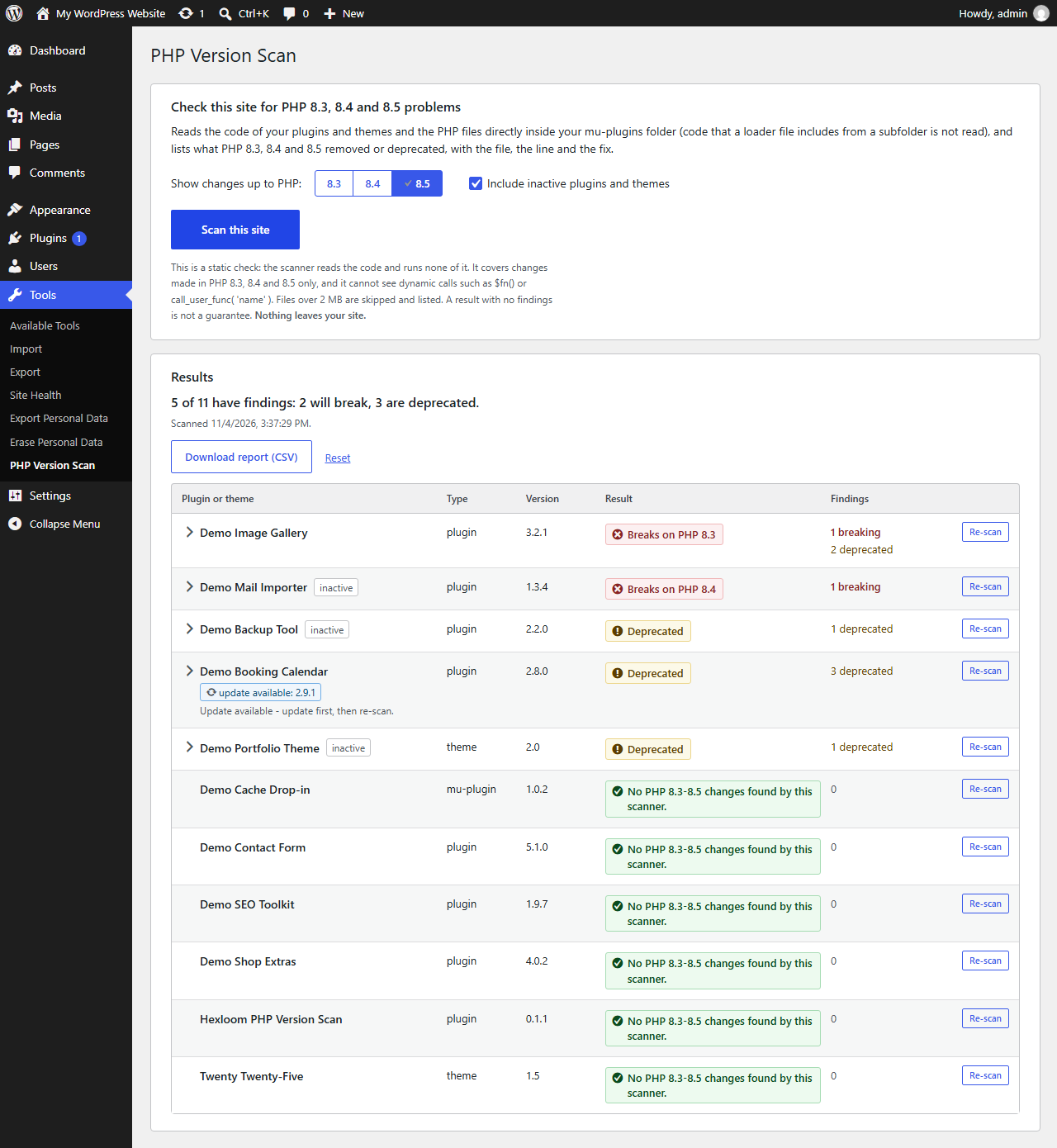
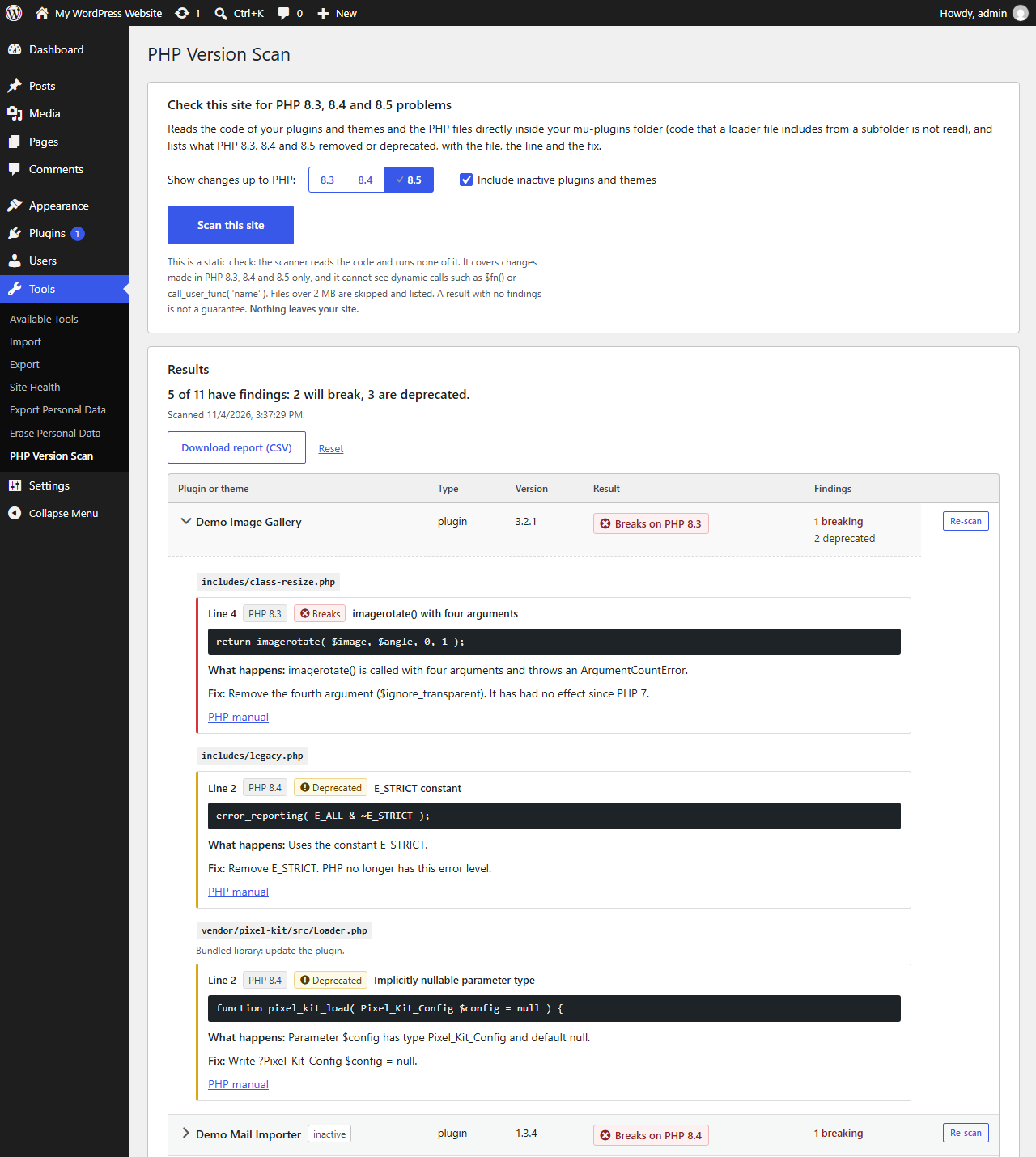
Hexloom PHP Version Scan, from Hexloom Labs, reads the code of every plugin and theme on your site, and the PHP files directly inside your mu-plugins folder, and lists what PHP 8.3, 8.4 and 8.5 removed or deprecated. Code that a mu-plugins loader file includes from a subfolder is not read. For each finding you see the file, the line, the line of code, the PHP version that made the change, what happens, what to do about it, and a link to the matching page of the PHP manual. Each plugin and theme gets a plain verdict: it breaks, it is deprecated, or this scanner found nothing.
The scanner looks for 55 changes in PHP 8.3, 8.4 and 8.5, for example implicitly nullable parameter types (PHP 8.4) and non-standard cast names such as (integer) (PHP 8.5).
Hexloom PHP Version Scan is not affiliated with the PHP project.
Built for shared hosting
- The scan itself runs in steps of about three seconds, with a progress bar, so a slow host is held up by one short step at a time, not by one long request. The list of files is built when a scan starts and can take a few seconds on a site with tens of thousands of files.
- Close the page or lose the connection and you can resume where the scan stopped.
- A file that crashes PHP while it is read is skipped and listed with the reason, and the scan carries on.
- It reads one file at a time and skips a file that would not fit in the free memory of your host, so a small memory limit does not stop the scan.
What you get
- One line per plugin, theme and mu-plugin, worst first, with „inactive“ and „update available“ tags.
- Findings grouped by file, with notes for bundled libraries (the fix is to update the plugin) and test files.
- A switch to show changes up to PHP 8.3, 8.4 or 8.5.
- A Re-scan button on every line, for after you update a plugin.
- A CSV download of the report, built in your browser.
What it does not do (read this)
- It is a static check. The scanner reads your code and runs none of it, so it cannot see dynamic calls such as
$fn()orcall_user_func( 'name' ), or methods called on an object whose class it cannot know. - It covers changes made in PHP 8.3, 8.4 and 8.5 only. Changes made in PHP 8.2 and earlier are not checked.
- Only the PHP files directly inside the mu-plugins folder are read. Code that a loader file includes from a subfolder is not read, and is not listed as skipped.
- Files over 2 MB, and files too large for the free memory of your host, are skipped and listed with the reason. A plugin or theme with skipped files and no findings shows „No changes found in the files read“ instead of the green result.
- A result with no findings means this scanner found nothing. It is not a guarantee, so test the upgrade on a staging copy before you change PHP on a live site.
- It does not edit your code. It tells you where to look; fixing a plugin is up to its developer or you.
Nothing leaves your site
The plugin makes no requests to any other server, loads no outside scripts, fonts or images, and collects no data. The links to the PHP manual, to the review page and to the Hexloom Pro page open only when you click them.
Optional Pro add-on (sold separately)
Hexloom Pro is a separate paid add-on from Hexloom Labs. It re-scans after each plugin or theme update and e-mails the report. This plugin has no locked features and works fully without it. Details: https://hexloomlabs.com/php-scan/
Снимци екрана


Постављање
- Install the plugin from Plugins > Add New, or upload the zip.
- Activate it.
- Open Tools > PHP Version Scan and press „Scan this site“.
On a multisite network, network-activate the plugin and open Settings > PHP Version Scan in the Network Admin. Only super admins can use it. The network screen was checked by reading the code and has not been run on a live network yet.
ЧПП
-
Does it change my site?
-
No. It never edits your plugins, themes or files. It saves its progress and the last results in your database, and the Reset link or deleting the plugin removes them.
-
Does it send anything out?
-
No. The plugin makes no requests of its own. The „update available“ tags come from the update information WordPress already holds.
-
Why only PHP 8.3 to 8.5?
-
The plugin is built for the newest versions, where most sites are about to move. Changes made in PHP 8.2 and earlier are not checked, so a site that still runs PHP 7.4 or 8.0 needs a tool that also covers those versions.
-
Does „No PHP 8.3-8.5 changes found by this scanner.“ mean the plugin is safe?
-
No. It means the scanner found none of the changes it knows about in the files it could read. Dynamic code cannot be seen, and files over 2 MB are skipped and listed. Test on a staging copy before you change PHP on a live site.
-
Does it read mu-plugins?
-
It reads the PHP files directly inside the mu-plugins folder. Code that a loader file includes from a subfolder is not read, and is not listed as skipped, so a loader file with no findings tells you nothing about the folder it loads.
-
A plugin shows „update available“. What should I do?
-
Update it first, then press Re-scan on its line. The developer may already have fixed what the scanner found.
-
The findings are in a „vendor“ or „lib“ folder.
-
Those files are libraries bundled inside the plugin. You cannot fix them yourself without editing the plugin, so the fix is an updated version of the plugin. The finding is marked as such.
-
How long does a scan take?
-
It depends on how many files you have and how fast your host is. The page shows progress as it goes. The scan itself runs in steps of about three seconds, so a slow host is held up by one short step at a time, not by one long request. Building the list of files when a scan starts can take a few seconds on a site with tens of thousands of files. You can leave the page and resume later.
-
Which PHP versions does the plugin itself run on?
-
PHP 7.4 to 8.5. It needs the PHP tokenizer extension, which is part of a normal PHP install; if it is off, the plugin shows a notice that says what to ask your host.
-
Is it working for you?
-
If the scan helped, a short honest review on the plugin page helps other site owners find it. If something was reported wrongly, please open a thread in the support forum and say which plugin and file, so it can be checked.
Рецензије
Нема рецензија за овај додатак.
Сарадници и градитељи
„Hexloom PHP Version Scan“ је софтвер отвореног кода. Следећи људи су допринели овом додатку.
Сарадници
Преведите „Hexloom PHP Version Scan“ на свој језик.
Заинтересовани сте за развој?
Прегледајте кôд, погледајте SVN складиште или се претплатите на дневник развоја преко RSS-а.
Дневник измена
0.1.1
- A plugin or theme with files that could not be read no longer gets the green „no changes“ result. It now says „No changes found in the files read“ and shows how many files were not scanned.
- A plugin or theme with no PHP files now says „Nothing to scan“ instead of „Not scanned“.
- The readme now describes the scan speed exactly: steps of about three seconds, and a list of files that is built when a scan starts, which can take a few seconds on a large site.
- The readme and the scan screen now say that only the PHP files directly inside the mu-plugins folder are read.
- The plugin only reads and deletes its own saved results.
0.1.0
- First release.