
Опис
This plugins allows you to keep the Copyright year of the website always updated by getting the current year and storing it in the shortcode [current_year].
There are three variations of this plugin’s shortcode
[current_year] – This shortcode displays the current year. Assuming that the current year is 2015 then the shortcode will display „2015“ (without quotes) wherever it is used.
[current_year_with_copyright_symbol] – This shortcode displays the current year with the copyright symbol to its left. Assuming the current year to be 2015 the shorcode will display „© 2015“ (without quotes) wherever it is used.
[current_year_with_copyright_symbol_and_title] – This shortcode displays the current year with the copyright symbol and site title to its left. Assuming the current year to be 2015 the shorcode will display „Site Title © 2015“ (without quotes) wherever it is used.
Shortcode Features Available
- Current Year
- Current Year with copyright symbol
- Current Year with copyright symbol and title
Снимци екрана
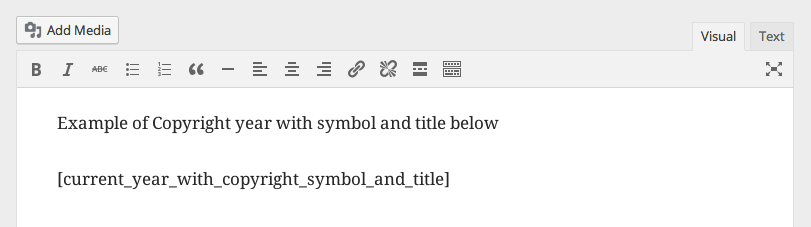
Usage of shortcode in Post/Page Editor
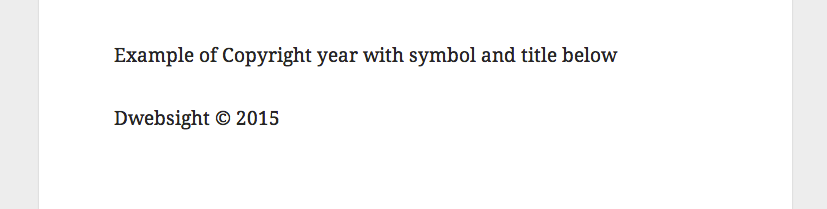
Output of shortcode on front-end
Постављање
Installing directly from wordpress backend
- Goto Plugins -> Add New
- Search for Dynamic Year and Copyright Shortcode
- Install and Activate the plugin
- Use the shorcode variations [current_year], [current_year_with_copyright_symbol] and [current_year_with_copyright_symbol_and_title] wherever you want.
Installing by uploading the plugin to wordpress
- Goto https://wordpress.org/plugins/dynamic-year-and-copyright-shortcode/
- Click on Download to download the plugin to your system
- Upload the plugin to wp-content/plugins/ using FTP or Cpanel and extract the zipped file
- Goto Plugins and Activate the plugin
- Use the shorcode variations [current_year], [current_year_with_copyright_symbol] and [current_year_with_copyright_symbol_and_title] wherever you want.
ЧПП
- Installation Instructions
-
Installing directly from wordpress backend
- Goto Plugins -> Add New
- Search for Dynamic Year and Copyright Shortcode
- Install and Activate the plugin
- Use the shorcode variations [current_year], [current_year_with_copyright_symbol] and [current_year_with_copyright_symbol_and_title] wherever you want.
Installing by uploading the plugin to wordpress
- Goto https://wordpress.org/plugins/dynamic-year-and-copyright-shortcode/
- Click on Download to download the plugin to your system
- Upload the plugin to wp-content/plugins/ using FTP or Cpanel and extract the zipped file
- Goto Plugins and Activate the plugin
- Use the shorcode variations [current_year], [current_year_with_copyright_symbol] and [current_year_with_copyright_symbol_and_title] wherever you want.
- How to display the current year with copyright symbol?
-
Please use [current_year_with_copyright_symbol]
- How to display the current year with copyright symbol and title?
-
Please use [current_year_with_copyright_symbol_and_title]
Прегледи


Сарадници и градитељи
„Dynamic Year and Copyright Shortcode“ је софтвер отвореног кода. Следећи људи су допринели овом додатку.
Сарадници
Преведите „Dynamic Year and Copyright Shortcode“ на свој језик.
Заинтересовани сте за градњу?
Прегледајте код, проверите SVN складиште или се пријавите на белешку градње преко RSS-а.
Белешка о изменама
0.1
- Initial version