

Опис
Желите да преузмете контролу над URL-овима свог Вордпрес сајта? Додатак Custom Permalinks вам даје моћ да подесите јединствене, произвољне URL-ове за било који чланак, страницу, ознаку или категорију. То значи да структуру сајта можете осмислити тачно онако како је замишљате, уместо да вас ограничавају подразумевана подешавања Вордпреса. Када подесите произвољну сталну везу, првобитни URL чланка аутоматски ће се преусмеравати на ваш нови, прилагођени URL.
Главне функције
- A custom URL for any content: Set a unique permalink for any post, page, public custom post type (e.g. WooCommerce products), category, tag, or custom taxonomy term.
- Permalink structures per post type: Define a structure for each public post type from tags like
%year%,%category%, or your custom taxonomies. New content gets its permalink automatically, and you can still edit any permalink by hand. - Automatic redirects: The original URL redirects to the custom permalink, so existing links, bookmarks, and search rankings keep working.
- Multilingual: Works with WPML and Polylang, with a separate custom permalink for each translation.
- URLs in any language: Permalinks in non-Latin scripts, such as Arabic, Thai, or Cyrillic, work as you type them.
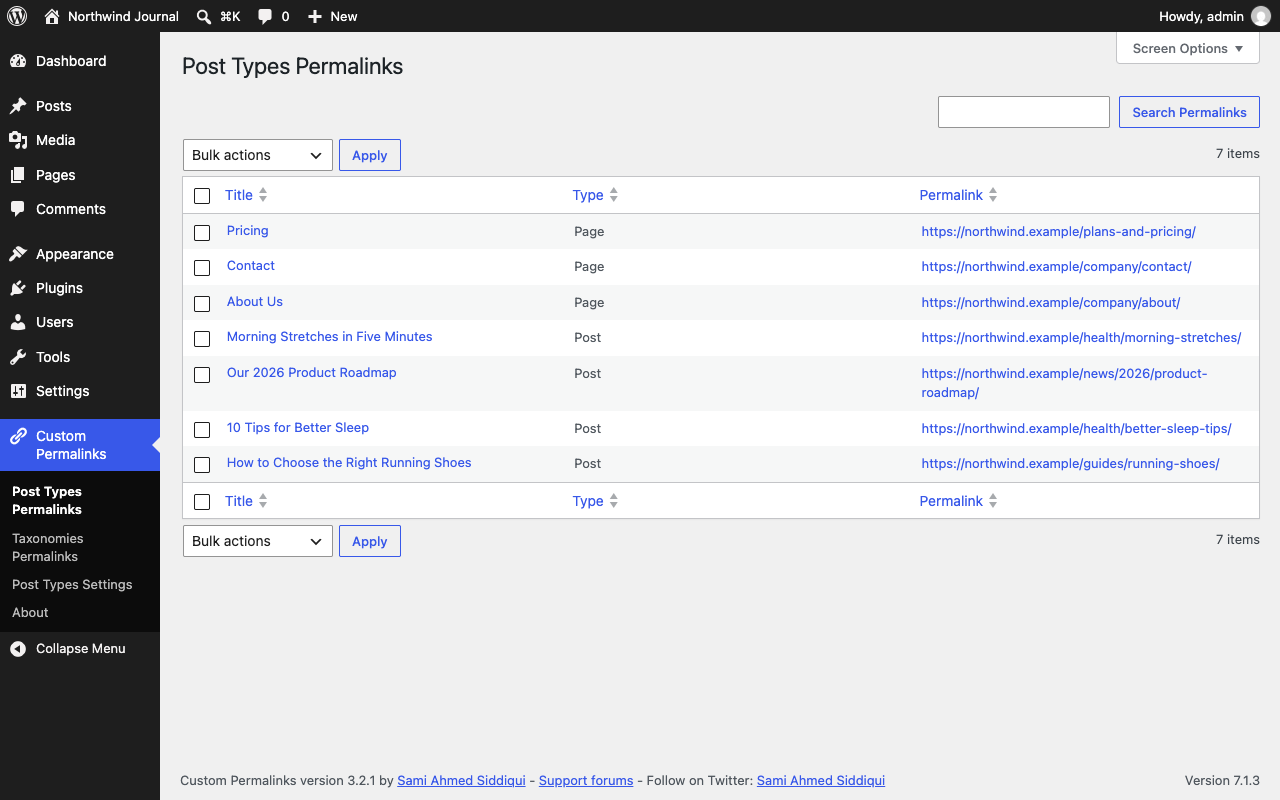
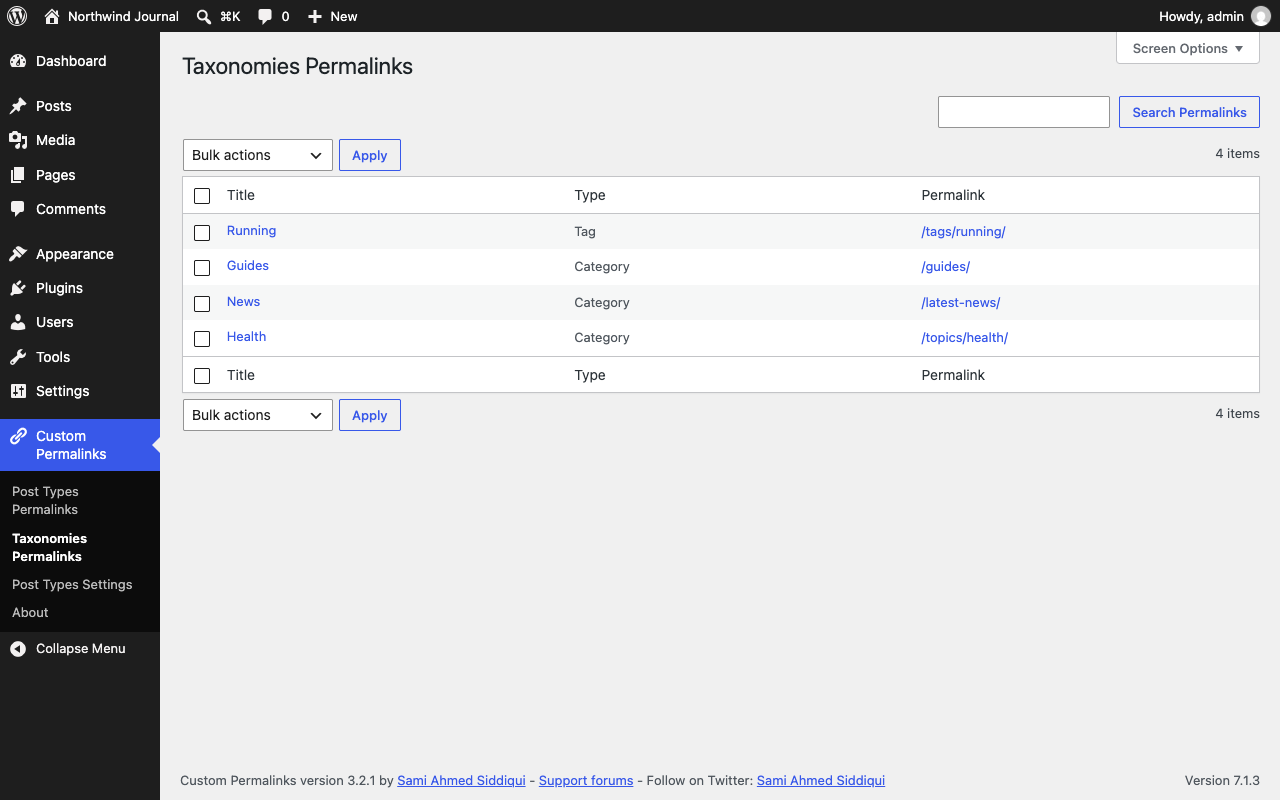
- All permalinks in one place: The Post Types Permalinks and Taxonomies Permalinks screens list every custom permalink, with search and bulk delete.
- A role for permalink managers: The Custom Permalinks Manager role lets non-administrators view and edit permalinks.
- Developer friendly: Filters and actions to add your own tags, generate permalinks in code, and control sanitizing and redirects.
Први кораци: подешавања додатка
Custom Permalinks adds a Custom Permalinks menu to your WordPress dashboard:
- Post Types Permalinks and Taxonomies Permalinks: Every custom permalink on your site, with search and bulk delete.
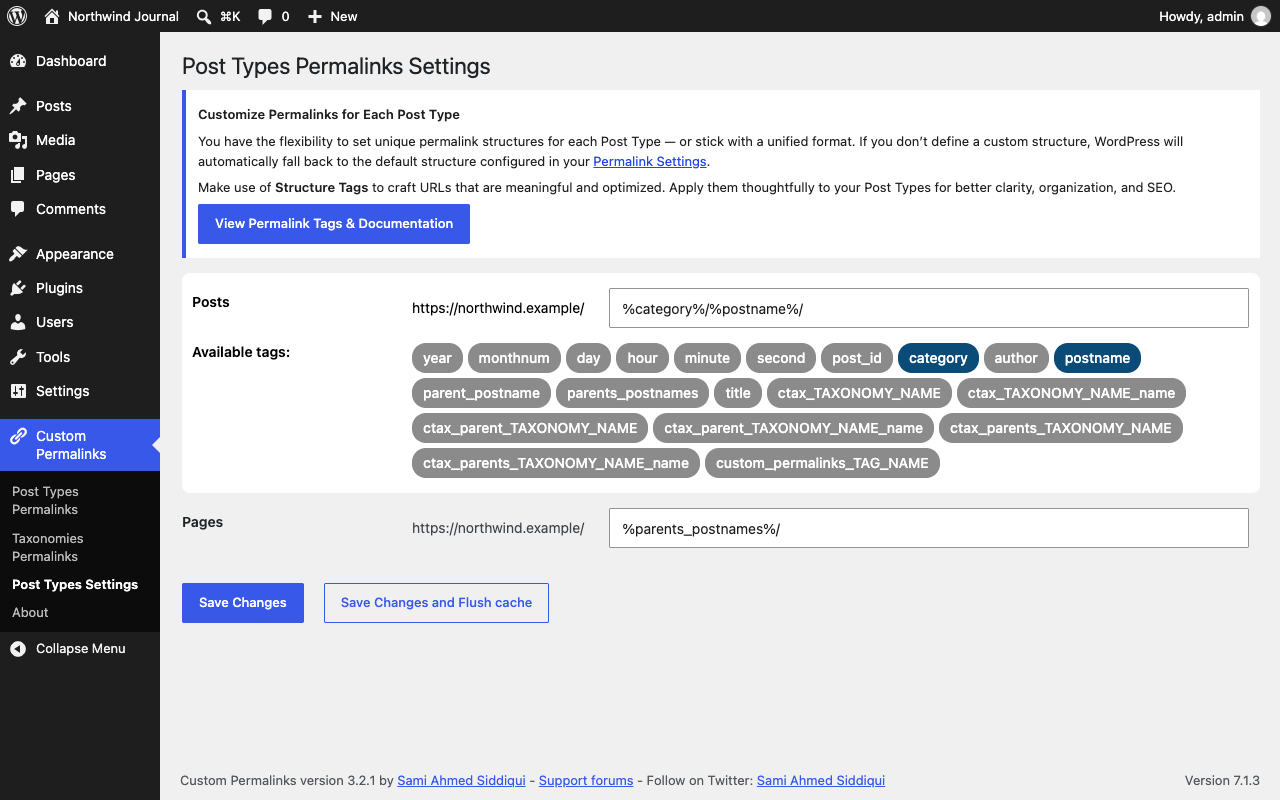
- Post Types Settings: A permalink structure for each public post type, built from the tags below. Leave a structure empty to keep WordPress’s default for that post type.
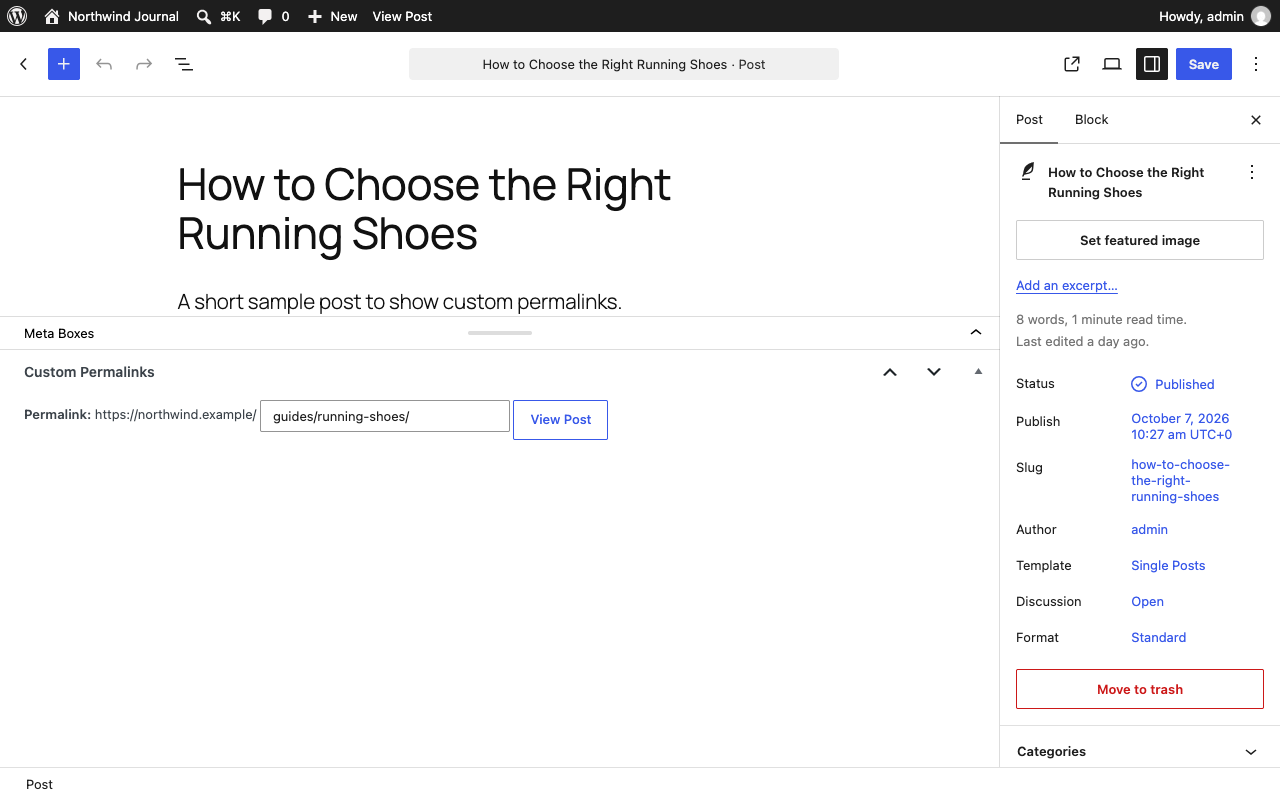
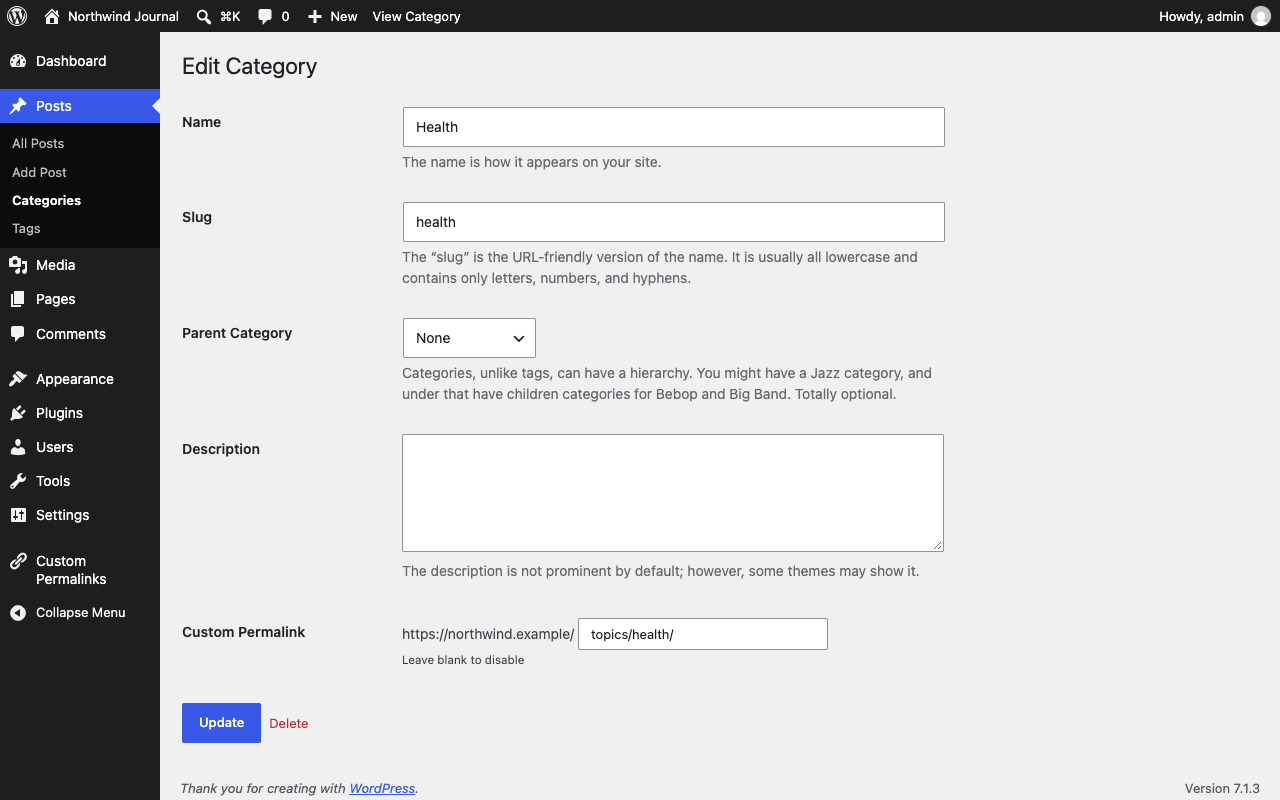
Да бисте подесили сталну везу за појединачни чланак, страницу, категорију или ознаку, уредите ту ставку и потражите поље Произвољна стална веза при врху (или у бочној траци) екрана уређивача – унесите жељену путању URL-а и сачувајте.
Доступне ознаке за структуре сталних веза
При подешавању структура произвољних сталних веза можете користити разне ознаке које динамички попуњавају URL. Ево прегледа доступних:
- %year%: година чланка у четири цифре, нпр.: 2025
- %monthnum%: месец објављивања чланка у две цифре, нпр.: 01
- %day%: дан објављивања чланка у две цифре, нпр.: 02
- %hour%: сат у дану када је чланак објављен, нпр.: 15
- %minute%: минут сата у коме је чланак објављен, нпр.: 43
- %second%: секунда минута у којој је чланак објављен, нпр.: 33
- %post_id%: јединствени ИБ чланка, нпр.: 123
- %category%: чисто издање назива категорије (њено кратко име). Угњеждене поткатегорије појавиће се као угњеждени директоријуми у URL-у..
- %author%: The post author’s username (login name). Note that this makes usernames visible in your URLs.
- %postname%: чисто издање наслова чланка или странице (његово кратко име). На пример, „This Is A Great Post!“ у URL-у постаје
this-is-a-great-post. - %parent_postname%: слично као
%postname%, али користи кратко име непосредне родитељске странице ако је родитељ изабран. - %parents_postnames%: слично као
%postname%, али укључује кратка имена свих родитељских страница ако су родитељи изабрани. - %title%: наслов чланка претворен у кратко име. На пример, „This Is A Great Post!“ постаје
this-is-a-great-post. За разлику од%postname%који се поставља једном,%title%се аутоматски ажурира у сталној вези ако се наслов чланка промени (осим ако је чланак објављен или је стална веза ручно уређена). - %ctax_TAXONOMY_NAME%: A clean version of a custom taxonomy’s name. Replace
TAXONOMY_NAMEwith the actual taxonomy name. - %ctax_TAXONOMY_NAME_name%: The custom taxonomy term’s name (instead of its slug). Replace
TAXONOMY_NAMEwith the actual taxonomy name. - %ctax_parent_TAXONOMY_NAME%: слично као
%ctax_TAXONOMY_NAME%, али укључује кратко име непосредне родитељске категорије/ознаке у URL ако је родитељ изабран. - %ctax_parent_TAXONOMY_NAME_name%: слично као
%ctax_TAXONOMY_NAME_name%, али укључује назив непосредног родитељског израза ако је родитељ изабран. - %ctax_parents_TAXONOMY_NAME%: слично као
%ctax_TAXONOMY_NAME%, али укључује кратка имена свих родитељских категорија/ознака у URL ако су родитељи изабрани. - %ctax_parents_TAXONOMY_NAME_name%: слично као
%ctax_TAXONOMY_NAME_name%, али укључује називе свих родитељских израза ако су родитељи изабрани. - %custom_permalinks_TAG_NAME%: програмери имају слободу да одреде сопствене произвољне ознаке (замените
_TAG_NAMEжељеним називом). Да бисте осигурали да ове ознаке дају исправне сталне везе, само примените филтерcustom_permalinks_post_permalink_tag.
Важна напомена: за нове чланке, Custom Permalinks ће наставити да ажурира сталну везу док је чланак у режиму нацрта, под условом да је структура одређена у подешавањима додатка. Када се чланак објави или се његова стална веза ручно ажурира, додатак ће престати са аутоматским ажурирањем за тај чланак.
Custom Permalinks: фино подешавање помоћу филтера
Custom Permalinks нуди низ филтера који програмерима омогућавају прецизну контролу понашања. Све доступне филтере, са примерима исечака кода, можете истражити у нашем GitHub спремишту.
За помоћ:
- Премијум корисници: ако вам је потребна помоћ у примени ових филтера, слободно нам се обратите преко наше премијум подршке.
- Други корисници: аутору додатка се можете обратити и директно преко LinkedIn-а.
Потребна вам је помоћ или сте пронашли грешку?
- Подршка: за индивидуалну подршку путем е-поште, размислите о куповини Custom Permalinks Premium. Иако се нека основна подршка може пружити на WordPress.org форумима, подршка путем е-поште има предност за премијум кориснике.
- Пријаве грешака: ако наиђете на грешку, пријавите је на GitHub-у. Обавезно наведите потпуне податке за понављање проблема. GitHub је за пријаве грешака, а не за општа питања подршке.
Ако имате проблеме који руше сајт након надоградње, пријавите их на Вордпрес форуму или GitHub-у са детаљним подацима. Увек се можете вратити на старије издање преузимањем са https://wordpress.org/plugins/custom-permalinks/advanced/.
Снимци екрана
Постављање
Custom Permalinks можете поставити на два начина:
Из Вордпреса
- Идите на Додаци > Додај нови на Вордпрес контролној табли.
- Потражите „Custom Permalinks“.
- Притисните „Постави сада“, а затим „Укључи“ додатак са странице „Додаци“.
Ручно преко FTP-а
- Преузмите фасциклу
custom-permalinks. - Отпремите фасциклу
custom-permalinksу директоријум/wp-content/plugins/. - Укључите Custom Permalinks кроз изборник „Додаци“ на Вордпрес контролној табли.
ЧПП
-
Шта се дешава са првобитним URL-ом када подесим произвољну сталну везу?
-
Custom Permalinks аутоматски преусмерава првобитни (подразумевани) URL на вашу нову произвољну сталну везу, тако да постојеће везе, обележивачи и рангирање у претраживачима настављају да раде.
-
Да ли ће ово утицати на SEO мог сајта?
-
Не би требало да шкоди – пошто првобитни URL преусмерава на нови, претраживачи и постојеће повратне везе и даље исправно воде на циљ. Коришћење чистих, описних произвољних сталних веза може учинити ваше URL-ове читљивијим, што је генерално добро за SEO.
-
Да. Custom Permalinks подржава чланке, странице, све јавне произвољне врсте чланака и категорије/ознаке (и изразе других произвољних таксономија).
-
Да ли ради са произвољним врстама чланака, као што су WooCommerce производи?
-
Да. Можете подесити појединачну произвољну сталну везу за било коју јавну произвољну врсту чланка или одредити аутоматску структуру сталних веза за целу врсту чланка у Подешавања > Custom Permalinks.
-
Да ли је Custom Permalinks усаглашен са WPML-ом или Polylang-ом?
-
Да, додатак је усаглашен и са WPML-ом и са Polylang-ом, укључујући преведене чланке који имају сопствену произвољну сталну везу.
-
Can I use non-English characters in my permalinks?
-
Yes. Permalinks in non-Latin scripts, such as Arabic, Thai, Cyrillic, or Chinese, work as you type them. Browsers request these URLs percent-encoded, and Custom Permalinks matches them either way.
-
Where do the plugin’s translations come from?
-
From translate.wordpress.org. WordPress downloads them automatically for your site’s language. If the plugin shows in English on a translated site, update the translations from Dashboard > Updates. You can also help translate it there.
-
Могу ли да дозволим кориснику који није администратор да управља сталним везама?
-
Да. Додатак додаје посебну улогу Custom Permalinks Manager (и одговарајуће способности) тако да одређеним корисницима који нису администратори можете дозволити да прегледају или уређују сталне везе без давања пуног администраторског приступа.
-
Могу ли да користим слова са акцентима, велика слова или додатне цртице у сталним везама?
-
Подразумевано, Custom Permalinks чисти сталне везе на исти начин као основа Вордпреса (мала слова, без акцената, без поновљених цртица). Програмери могу уклонити ова ограничења филтерима
custom_permalinks_allow_accents,custom_permalinks_allow_capsиcustom_permalinks_redundant_hyphens. Погледајте одељак Advanced Customization and Filters на GitHub-у. -
Преглед у јавном делу градитеља страница (Cornerstone итд.) се квари или губи режим уређивања на страницама са произвољном сталном везом
-
Неки градитељи страница учитавају свој преглед уживо/у јавном делу у iframe-у помоћу
POSTзахтева који носи посебне вредности потребне градитељу (на пример Cornerstone-овcs_preview_time). Ако та страница има и произвољну сталну везу, Custom Permalinks може преусмерити захтев, а пошто се преусмеравања прате каоGET,POSTподаци градитеља се губе и преглед се квари.Можете рећи Custom Permalinks да прескочи своје преусмеравање за тај захтев помоћу филтера
custom_permalinks_avoid_redirect, додатог у вашу тему или додатак за одређени сајт:add_filter( 'custom_permalinks_avoid_redirect', function( $permalink ) { if ( isset( $_POST['cs_preview_time'] ) ) { // Adjust to match the field your builder sends. return true; } return false; } );Погледајте одељак Advanced Customization and Filters на GitHub-у за овај и друге доступне филтере.
-
Шта се дешава са мојим произвољним сталним везама ако искључим или уклоним додатак?
-
Искључивање додатка задржава све сачуване произвољне сталне везе у бази података – поновно укључивање их одмах враћа. Уклањање (брисање) додатка трајно уклања све сачуване произвољне сталне везе и подешавања додатка, а ваши URL-ови ће се вратити на подразумевану структуру сталних веза Вордпреса.
-
Моја произвољна стална веза се не чува или страница не преусмерава – шта да проверим?
-
- Уверите се да Подешавања > Сталне везе није подешено на „Обично“.
- Потврдите да ниједан други SEO/додатак за преусмеравање (Yoast, RankMath, Redirection итд.) нема сукобљено правило за исти URL.
- Проверите да стална веза већ није коришћена за други чланак – Custom Permalinks неће применити удвојени URL.
- И даље имате проблем? Погледајте „Потребна вам је помоћ или сте пронашли грешку?“ изнад или нам се обратите преко GitHub-а или премијум подршке.
Рецензије


Сарадници и градитељи
„Custom Permalinks“ је софтвер отвореног кода. Следећи људи су допринели овом додатку.
Сарадници
„Custom Permalinks“ је преведен на 19 језика. Хвала преводиоцима на њиховим доприносима.
Преведите „Custom Permalinks“ на свој језик.
Заинтересовани сте за развој?
Прегледајте кôд, погледајте SVN складиште или се претплатите на дневник развоја преко RSS-а.
Дневник измена
3.3.3 – Oct 13, 2026
- Грешка:
- Fixed an infinite redirect loop on percent-encoded custom permalinks without a trailing slash (e.g. Japanese), a regression in 3.3.0.
3.3.2 – Oct 11, 2026
- Грешка:
- Fixed custom permalinks in non-Latin scripts returning a 404 (e.g. Persian) when a shorter custom permalink matched the start of the URL (e.g. a
product/page forproduct/سلام/), a regression in 3.3.0. - Fixed custom permalinks in non-Latin scripts not loading with an endpoint appended (e.g.
/سلام/feed/).
- Fixed custom permalinks in non-Latin scripts returning a 404 (e.g. Persian) when a shorter custom permalink matched the start of the URL (e.g. a
3.3.1 – Oct 8, 2026
- Грешка:
- Fixed the editor’s View Post and preview links not updating, or the wrong links being updated, after saving a custom permalink when the post’s previous URL contained characters such as
?,+or((e.g.?p=123for drafts). - Hardened the editor script to only update links with an http(s) URL on the site’s own domain.
- Fixed the editor’s View Post and preview links not updating, or the wrong links being updated, after saving a custom permalink when the post’s previous URL contained characters such as
- Accessibility:
- Added labels for screen readers to the checkboxes in Post Types Permalinks and Taxonomies Permalinks, the structure fields in Post Types Settings, and the Custom Permalink field on category, tag, and term screens.
- Raised the text contrast of the structure tags in Post Types Settings and of the plugin descriptions on the About screen, and underlined links in its text.
3.2.1 – Oct 1, 2026
- Changes to be aware of:
- Requires WordPress 5.9 and PHP 7.4 or later, the oldest versions the plugin is now tested on. Sites on older versions keep 3.2.1.
- Translations now come from translate.wordpress.org instead of files bundled with the plugin. It covers every bundled language and adds Serbian. Sites that installed the plugin outside wordpress.org, or turned off automatic translation updates, show English until the language pack is installed from Dashboard Updates.
- WPML translations now always resolve to their own custom permalink. Previously they returned another language’s custom permalink depending on the active (admin) language, which listed wrong URLs in Post Types Permalinks and in SEO plugins’ indexables and XML sitemaps (e.g. Yoast SEO).
%ctax_parents_TAXONOMY_NAME_name%now uses the parent terms’ names, as documented, instead of their slugs. Permalinks generated from now on change where a parent term’s name differs from its slug; saved permalinks are not changed.
- Redirects and URLs:
- Fixed custom permalinks in non-Latin scripts (e.g. Thai, Arabic, Cyrillic) returning a 404 or redirecting in an infinite loop, as the browser requests them percent-encoded while they are saved unencoded (or vice versa, depending on the site language).
- Fixed the trailing-slash redirect and the redirect to the custom permalink dropping the page number (e.g.
/news/page/2redirected to/news/instead of/news/page/2/). - Added the
custom_permalinks_disable_remove_page_numberfilter to keep the/page/{number}segment in the requested URL, for custom archive pages whose pagination doesn’t advance. - Fixed the query string being corrupted (e.g.
foo=barbecamehttp://foo=bar) after a custom permalink was resolved. - Fixed comment links on paginated comments (e.g.
/my-post/comment-page-2/) not following the custom permalink’s trailing slash, so a custom permalink without a trailing slash no longer gets comment URLs with one, and vice versa.
- WPML and Polylang:
- Fixed the WPML language switcher linking back to the current language instead of the translation when languages are in directories (e.g.
/en/,/de/) and the translation uses the same custom permalink. - Fixed WPML language directories that differ from the language code (e.g.
/de-de/forde, as in WPML 5.0) not being repaired when duplicated, and the default language getting its directory added to a permalink when „hide the default language directory“ is on. - Fixed English custom permalinks not being lowercased and cleaned of special characters with WPML 5.0’s region-based language codes (e.g.
en-us). - Fixed Polylang translations sharing the same custom permalink (e.g.
/en/technologyand/zh/technology) redirecting to the other language when the translation’s stored language was missing or out of date.
- Fixed the WPML language switcher linking back to the current language instead of the translation when languages are in directories (e.g.
- Admin screens:
- Fixed Post Types and Taxonomies Permalinks pagination showing the first page’s results on every page, ignoring sorting and search, when a persistent object cache (e.g. Redis or Memcached) is enabled. The lists now also refresh right after a permalink is added, changed or deleted.
- Fixed bulk delete and search in Post Types and Taxonomies Permalinks failing with a „headers already sent“ warning instead of redirecting.
- Fixed short titles and permalinks being padded with leading spaces in the Post Types and Taxonomies Permalinks lists.
- Fixed every post of a type showing and saving the same custom permalink when a theme or plugin runs a custom loop in the admin without resetting the global post.
- Fixed the original permalink showing as the custom permalink in the edit screen’s permalink box and in the block editor, and being compared against when saving a post or term.
- Fixed a fatal error on WordPress 5.9 and 6.0 when saving the Post Types Permalinks settings with the cache flush option, as
wp_cache_flush_group()needs WordPress 6.1. Object caches that can’t flush a single group now get a full cache flush. - Fixed the „Custom Permalinks Manager“ role name not being translatable.
- Fixed Post Types Settings showing the WordPress address instead of the site address before each structure, which is wrong when WordPress is installed in a subdirectory.
- Compatibility:
- Fixed WooCommerce notices about accessing order data directly on order screens, as the permalink form read post fields from the
WC_Orderobject. - Fixed posts updated by WP All Import being handled as new posts, which turned permalink regeneration back on and could replace their custom permalink with the post type’s structure.
- Fixed the
seems_utf8()deprecation notice on WordPress 6.9 and later.
- Fixed WooCommerce notices about accessing order data directly on order screens, as the permalink form read post fields from the
Ранија издања
- За дневник измена ранијих издања погледајте засебну датотеку changelog.txt.