
Опис
Includes a \“spoiler\“ button and spoiler shortcode!
Use TinyMCE with bbPress is just what it sounds like – a scaled down version of the TinyMCE editor designed specifically for bbPress.
This plugin removes the Text editor and enables TinyMCE, allowing forum members to format their message in a way that\’s more intuitive and more closely resembles other forum software.
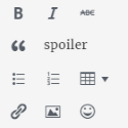
It includes buttons for:
- bold
- italic
- strikethrough
- blockquote
- spoiler button
- bulleted and numbered lists
- table support
- a bbPress-specific \“link\“ button (see below)
- insert/edit image
- emoticons
- full screen
Note: the \“insert/edit\“ link button in Use TinyMCE with bbPress is not the same button you\’re used to when it comes to editing posts and pages. It ONLY allows your forum users to include the link URL, text, title, and target. There are no options for linking to other internal posts or pages, as these options would most likely just confuse your members.
Use TinyMCE with bbPress is the forum editor I wish I\’d had when I first discovered bbPress.
Снимци екрана


Постављање
Unzip and then upload the \’bbp-tinymce\’ folder to the \’/wp-content/plugins/\’ directory
Activate the plugin through the \’Plugins\’ menu in WordPress.
That\’s it! Use TinyMCE with bbPress is ready to go!
ЧПП
- Installation Instructions
-
-
Unzip and then upload the \’bbp-tinymce\’ folder to the \’/wp-content/plugins/\’ directory
-
Activate the plugin through the \’Plugins\’ menu in WordPress.
That\’s it! Use TinyMCE with bbPress is ready to go!
-

Сарадници и градитељи
„Use TinyMCE with bbPress“ је софтвер отвореног кода. Следећи људи су допринели овом додатку.
Сарадници
Преведите „Use TinyMCE with bbPress“ на свој језик.
Заинтересовани сте за градњу?
Прегледајте код, проверите SVN складиште или се пријавите на белешку градње преко RSS-а.
Белешка о изменама
1.0 – Initial release