

Опис
Taboola Pixel for WooCommerce enables you to track user interactions on your WooCommerce store and integrate seamlessly with Realize’s advertising platform. This plugin provides a one-click, no-fuss solution to implement the Taboola Pixel on your store.
Implement the Taboola Pixel to use automated bidding, simplify retargeting, and optimize your ROAS (Return on Ad Spend).
The plugin provides:
- Easy setup: Just log in with your Realize account.
- Fully automatic implementation: No manual work needed.
- Smart Algorithms: Unlock Taboola’s algorithms with conversion data and audiences.
- Performance Safe: Doesn’t impact your website performance or SEO ranking.
- WooCommerce Integration: Seamless integration for e-commerce tracking.
Features
- Simple Setup: Connect your Realize account with just a few clicks.
- Automatic Event Tracking: Automatic tracking of e-commerce events including product views, add to cart, checkout, and purchases.
- Data-Driven Decisions: Make data-driven decisions with Taboola’s visualizations and reporting tools.
- Secure: Follows security best practices.
Support
For support, please visit our Dev Center or contact support@taboola.com.
Privacy Policy
This plugin sends data to Realize’s servers for analytics and advertising purposes. Please review Realize’s privacy policy at https://www.taboola.com/privacy-policy and ensure you have proper user consent mechanisms in place.
Снимци екрана
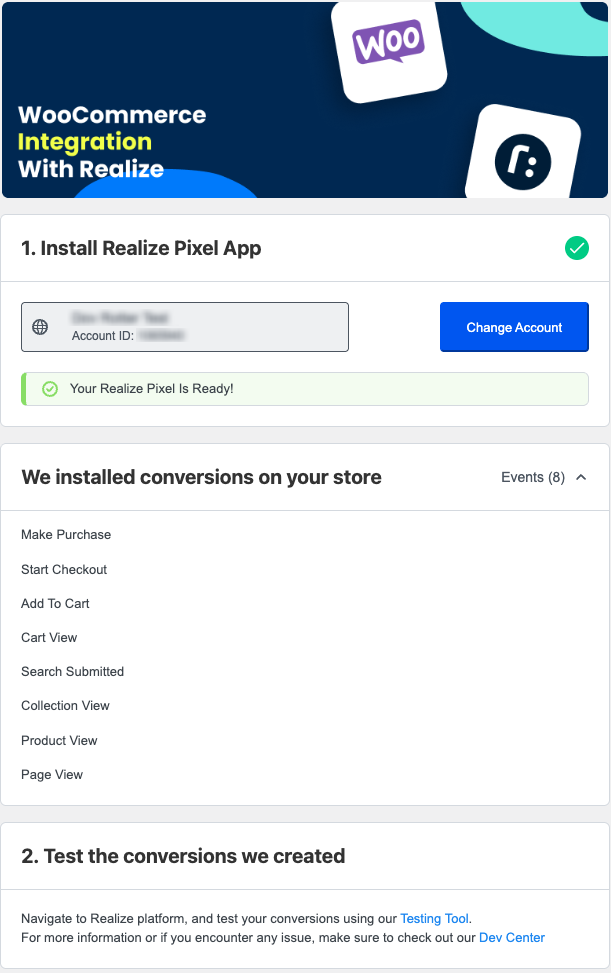
Integration With Realize: Connect your account easily.
Постављање
- Upload the plugin files to the
/wp-content/plugins/taboola-pixel-for-woocommercedirectory, or install the plugin through the WordPress plugins screen directly. - Activate the plugin through the ‘Plugins’ screen in WordPress.
- Navigate to the Taboola Pixel menu in your WordPress admin.
- Click „Connect Realize Account“ to link your Realize account.
- Follow the guided setup to install the pixel.
ЧПП
-
Do I need a Realize account to use this plugin?
-
Yes, you need a Realize account to use this plugin. You can sign up at https://signup.taboola.com/join
-
Can I track custom events?
-
The plugin automatically tracks standard e-commerce events. For custom event tracking it’s best to use our Codeless solution or manually modify the code. Read more in our Dev Center
-
How do I know that it works?
-
Use our Testing Tool, available in the Realize platform, to verify that your setup is good.
-
Is this plugin GDPR compliant?
-
The plugin respects user privacy settings. Please ensure you have proper consent mechanisms in place according to your local privacy laws.
-
Does this plugin work with WooCommerce?
-
Yes! The plugin automatically integrates with WooCommerce to track e-commerce events, including: product views, add to cart actions, checkout initiation, and completed purchases.
-
Does this plugin support Elementor?
-
No, this plugin does not currently support Elementor or other page builders. It is designed to work with the standard WooCommerce plugin.
-
How can I report security bugs?
-
You can report security bugs through the Patchstack Vulnerability Disclosure Program. The Patchstack team helps validate, triage and handle any security vulnerabilities. Report a security vulnerability.
Прегледи
Нема рецензија за овај додатак.
Сарадници и градитељи
„Taboola Pixel for WooCommerce“ је софтвер отвореног кода. Следећи људи су допринели овом додатку.
Сарадници
Преведите „Taboola Pixel for WooCommerce“ на свој језик.
Заинтересовани сте за градњу?
Прегледајте код, проверите SVN складиште или се пријавите на белешку градње преко RSS-а.
Белешка о изменама
1.1.0
- Added WooCommerce integration
- Automatic tracking of e-commerce events (product views, add to cart, checkout, purchases)
- Enhanced event tracking for online stores
1.0.0
- Initial release
- Taboola pixel integration
- Guided onboarding flow
- Account connection via popup
- Automatic pixel installation
- Event tracking for page views