
Опис
The complete trail camera management and protection system for WordPress.
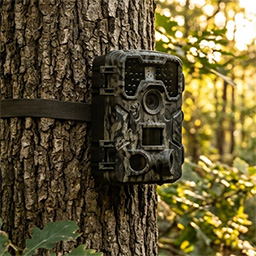
Whether you have a handful of trail cameras or a whole fleet, My Trail Camera keeps everything organized — models, locations, battery status, accessories, and total investment. And if a camera goes missing, the built-in honeypot trap gives you a real chance to get it back.
Camera Management
- Register trail cameras with model, location, GPS coordinates, deploy date, and accessories
- 80+ built-in camera profiles (Browning, Bushnell, Reconyx, Spypoint, Stealth Cam, Wachman, OXE, and 20+ more brands) with autocomplete search
- Battery life estimation based on camera profile, power type, trigger count, recording mode (photo/video), and video resolution (480p–4K)
- Track accessories and security measures — batteries, SD cards, locks, metal boxes, GPS trackers (AirTag, Tile, Samsung SmartTag), SIM cards — with total gear value in €
- Serial number and IMEI tracking per camera
- Camera status tracking: active, stored, stolen (with date), tested, recovered, police reported
- Days-in-field counter with planned deployment duration and progress indicator
- Power type support: lithium, alkaline, solar panel, external power
- WordPress dashboard widget with active/stolen counts, low battery warnings, and 24-hour detection summary
- Admin bar quick access with recent detection count badge
- Import/export all camera data and settings as JSON backup
Anti-Theft: Honeypot Trap on Your SD Card
Trail camera theft is a real problem. My Trail Camera fights back — place hidden HTML files on your SD cards, and when a thief opens one on their computer or phone, you get their IP address, GPS location, and device fingerprint. Evidence you can hand straight to the police.
- Works with any trail camera that uses SD cards — no special hardware needed
- Generate a ZIP with trap files that mimic real camera file naming (manufacturer-specific)
- Captured data: IP address, GPS coordinates with accuracy, browser fingerprint (OS, screen resolution, timezone, CPU cores)
- Real-time email alerts to multiple recipients — immediate notification on every detection
- Recovery chance scoring (0–100%) based on GPS accuracy, IP data, time factor, and device fingerprint — with recommended next steps
- Theft detection dashboard with per-camera filtering, detection history, and device analysis
- Owner test mode — open the trap file yourself to verify it works before deployment
- Works offline: trap files use GET requests for file:// protocol compatibility — data is sent as soon as the thief’s device connects to the internet
- Public shortcode [mtcam_stolen_cameras] — display stolen camera cards so your community can help
- Secured with HMAC signature verification, nonce replay protection, device ID validation, and multi-layer rate limiting (per-IP, per-file, per-device)
Location Reviews & Scoring
- Rate your trail camera locations after each deployment (activity, wildlife interest, human disturbance, satisfaction)
- Automatic scoring algorithm: A (75+), B (50–75), C (25–50), D (under 25)
- Interactive Leaflet map with color-coded markers — find your best spots at a glance
- Statistics: total reviews, average score, total monitoring days, total recordings
Settings & Tools
- Email notification configuration with multiple recipients
- IP source selection: direct, Cloudflare (CF-Connecting-IP), or reverse proxy (X-Forwarded-For)
- Public widget visibility controls — choose exactly which fields to show for stolen cameras
- Privacy policy auto-contribution — automatically adds data collection disclosure to your site’s privacy policy
- Maintenance tools: orphan record cleanup, manual data deletion, database optimization
- Import/export cameras, settings, and location reviews as JSON
- Onboarding checklist for first-time setup
- KML export for Google Earth
Privacy
The trap files only activate when someone opens them from a stolen SD card. No data is collected from your website visitors. See the FAQ for details on external services used.
External services
This plugin connects to the following third-party services under specific circumstances:
Google Maps
GPS coordinate links. When a camera has GPS coordinates, the plugin displays a „Open in Map“ link that opens Google Maps at that location. No data is sent automatically — the link is only followed when the admin clicks it.
- Service: Google Maps
- Data sent: GPS latitude and longitude (as URL parameters, only when the admin clicks the link)
- Terms of service
- Privacy policy
OpenStreetMap
Map tiles for location reviews. Camera GPS coordinates are displayed on interactive maps using Leaflet.js with OpenStreetMap tile layers.
- Service: OpenStreetMap
- Data sent: map tile requests contain viewport coordinates
- Terms of use
- Privacy policy
Freemius
Software licensing and analytics platform used for optional plugin updates and upgrade management. Handles license verification and provides an upgrade path to the Pro version.
- Service: Freemius
- Data sent: site URL, plugin version, PHP version (standard WordPress plugin telemetry, opt-in)
- Terms of service
- Privacy policy
Постављање
- Upload the plugin folder to the
/wp-content/plugins/directory - Activate the plugin through the ‘Plugins’ menu in WordPress
- Navigate to the menu in your admin panel
- Add your first camera and configure notification settings
ЧПП
-
How do the bait files work?
-
The plugin generates HTML files that you place on your trail camera SD cards. If someone steals the camera and opens these files on their computer, the files silently report the thief’s location and device information back to your WordPress site.
-
Does this work with any trail camera?
-
Yes, works with any trail camera that uses SD cards. The bait files are standard HTML files that work on any computer or phone with a web browser.
-
Is GPS tracking accurate?
-
GPS accuracy depends on the thief’s browser and device. Modern browsers can provide accuracy within 10-500 meters when the user grants location permission. The system also captures IP-based location as a fallback.
-
What data do the bait files collect and from whom?
-
Bait files collect IP address, browser fingerprint (user agent, screen resolution, timezone, OS), and optionally GPS coordinates — only when someone opens the HTML file from a stolen SD card. No data is collected from your website visitors. The camera owner can also open the bait file to verify it works, which marks the camera as „tested“ using their own IP. All collected data is stored in your site database and can be deleted at any time. Data is automatically deleted after 90 days.
-
Does this plugin use any external services?
-
Yes. All external services are fully documented in the „External services“ section below. A summary:
- Google Maps — GPS coordinate links (user-initiated, no automatic data transfer).
- OpenStreetMap — map tiles for location views. Sends viewport coordinates.
- Freemius — license management and optional analytics. Opt-in.
No data is collected from your website visitors. All services are documented with terms of use and privacy policy links in the „External services“ section.
Note: The plugin generates KML files for Google Earth export. The KML XML namespace reference (opengis.net/kml) is a standard XML schema identifier — no data is sent to this domain.
Прегледи
Нема рецензија за овај додатак.
Сарадници и градитељи
„My Trail Camera“ је софтвер отвореног кода. Следећи људи су допринели овом додатку.
Сарадници


Преведите „My Trail Camera“ на свој језик.
Заинтересовани сте за градњу?
Прегледајте код, проверите SVN складиште или се пријавите на белешку градње преко RSS-а.
Белешка о изменама
8.2.2
- Camera profiles: 80+ built-in trail camera models (Wachman, OXE, Spypoint, Browning, Bushnell, Stealth Cam, Tactacam, Moultrie, Reconyx, GardePro, and 20+ more brands)
- Profiles split into per-manufacturer files (includes/profiles/*.php) — easy to add new models
- Profile autocomplete: text input with instant filtering by manufacturer/model name, grouped by manufacturer with model count
- Video resolution setting: per-camera select populated from profile (480p–4K), affects battery estimation
- Battery estimation improvements: uses profile-specific battery capacity, standby drain, 4G drain, and per-photo consumption instead of hardcoded constants
- Photo mode battery calculation: realistic per-event drain from profile (drain_photo × 1.8 for night/IR)
- Resolution power factor: higher resolution = proportionally higher video power draw (1080p=1.0, 2K=1.15, 4K=1.30)
- Night video draw updated from 600 to 750 mA (more realistic for IR illumination + processing)
- Camera detail: new „Camera Profile“ section showing specs (FOV, battery, video, features, drain values, tip)
- SIM card accessory and IMEI field hidden for cameras without 4G capability (profile-aware)
- Metal Box added to accessories with price tracking; Security section label updated
- Edit form: camera model displayed as readonly text (not editable — model is physical)
- Moved thor_get_camera_total_value() and thor_battery_color() from cameras-battery.php to core-helpers.php
- Profile data corrections: verified FOV (lens vs PIR), battery capacity, video resolutions, SIM/WiFi/solar flags for all models
- Slovak translations: 1059 entries — all profile tips, battery types, and UI strings translated
- Compiled .mo translation file updated
8.2.1
- Added external services documentation to readme
- Replaced inline script/style tags with wp_add_inline_script and wp_add_inline_style
- Fixed Freemius SDK configuration for WordPress.org compliance
8.2.0
- Improved output escaping for full WordPress coding standards compliance
- Fixed PHP 7.4 compatibility (replaced str_contains with strpos)
- Inline sanitization of $_SERVER superglobals
- Enhanced battery estimation and camera management
8.1.1
- Unified prefix to thor_ for WordPress.org compliance
- Automatic migration from previous versions
- Security hardening: escaping, prepared statements, capability checks
- Improved plugin header with required fields
8.1.0
- Database-backed camera storage (migrated from wp_options)
- Location rating system with interactive map
- Battery estimation
- HMAC signature verification for bait file communications
- Rate limiting and nonce protection