
Опис
Add a dashboard theme.
Prepared for a five color scheme.
To use examples, you can add their own customized color scheme.
Arbitrary section
Images and CSS are included in the directory that defines the color scheme too.
WordPress changed to transparent so that the initial images, I can cope with any color scheme.
Localization
Japanese language file has been used only a description.
Снимци екрана
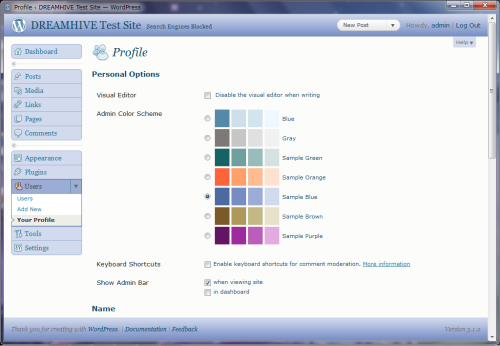
Постављање
- Upload the entire
dh-admin-themesfolder to the/wp-content/plugins/directory. - Activate the plugin through the ‘Plugins’ menu in WordPress
ЧПП
- Can I change the display name of the scheme?
-
There is a directory that defined the colors in the plugin directory.
This directory contains the „scheme definition file (colors_define.ini) “ there.
To change the display name, please change the „disp“ in the scheme definition file. - To add to the original color?
-
- Copy the color scheme defined directory, please rename.
- Edit the definition files in the directory.
„Name“ is given a unique ID please.
„Disp“ is the display name.
„Coloer1-4“ is the color scheme. - CSS files in the „name“ using the rename.
Ex) colors-XXXX.css - Replace a new color code the CSS file.
directory name for the color scheme does not rule
Прегледи
Нема рецензија за овај додатак.
Сарадници и градитељи
„DH Admin Themes“ је софтвер отвореног кода. Следећи људи су допринели овом додатку.
Сарадници
Преведите „DH Admin Themes“ на свој језик.
Заинтересовани сте за градњу?
Прегледајте код, проверите SVN складиште или се пријавите на белешку градње преко RSS-а.
Белешка о изменама
0.5.4
- Add Sample color scheme to work on WordPress 3.2.
0.5.3
- Updated to work on WordPress 3.0 & PHP4.
- Optimized code for constant definitions.
0.5.0
- First stable release.