
Опис
I’ve written an extremely basic plugin that handles what’s described in title : Internet Explorer 9′s new Pinning feature.
With this plugin installed and enabled, if any of your blog’s authors (or yourself) pin it to their Windows 7 Taskbar, they’ll have three new links:
- Write a post
- Moderate comments
- Upload new media
It will also display the 5 most recent posts titles for everyone.
Finally, it lets you set what color should be the back and forward buttons in IE9 after someone pins it.
Features
- Localized to french
Снимци екрана
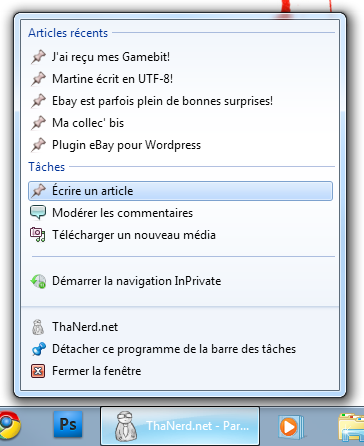
Here is a preview of what you could see when right-clicking your pinned website. 
A preview of the settings panel, which only allow previewing the back/forward buttons’ color
Постављање
- Upload
IE9-Pinningto the/wp-content/plugins/directory - Activate the plugin through the ‘Plugins’ menu in WordPress
- There’s actually only these two steps!
ЧПП
- I don’t have Windows 7 nor IE9, why would I install this plugin?
-
Because even if you don’t benefit these features, this plugin will allow your visitors to benefit them, and THEY may use Windows 7 and Internet Explorer 9…
- I changed the toolbar buttons’ color, but the changes are not reflected on my browser. What’s wrong?
-
The coloring feature works when you pin the website to your taskbar. If you do it afterwise, the changes won’t be reflected. They seem to be cached in a file located in this folder:
C:\Users\\AppData\Roaming\Microsoft\Internet Explorer\Quick Launch\User Pinned\TaskBar
So, the change you make won’t be visible unless you unpin then repin your website. The changes will however be visible to people who pin if afterwards…
Прегледи
Нема рецензија за овај додатак.
Сарадници и градитељи

Преведите „IE9-Pinning“ на свој језик.
Заинтересовани сте за градњу?
Прегледајте код, проверите SVN складиште или се пријавите на белешку градње преко RSS-а.
Белешка о изменама
1.1.0
- Added a very basic configuration screen
- Added ability to set the „back/forward“ buttons’ color
1.0.1
Fixed a bug where the „Recent posts“ actually displayed only the one most recent post, 5 times in a row.
1.0.0
First (too early) Release